Unbale to Activate IntelliJ IDEA Ultimate from my office laptop
Answered

Hello Team,
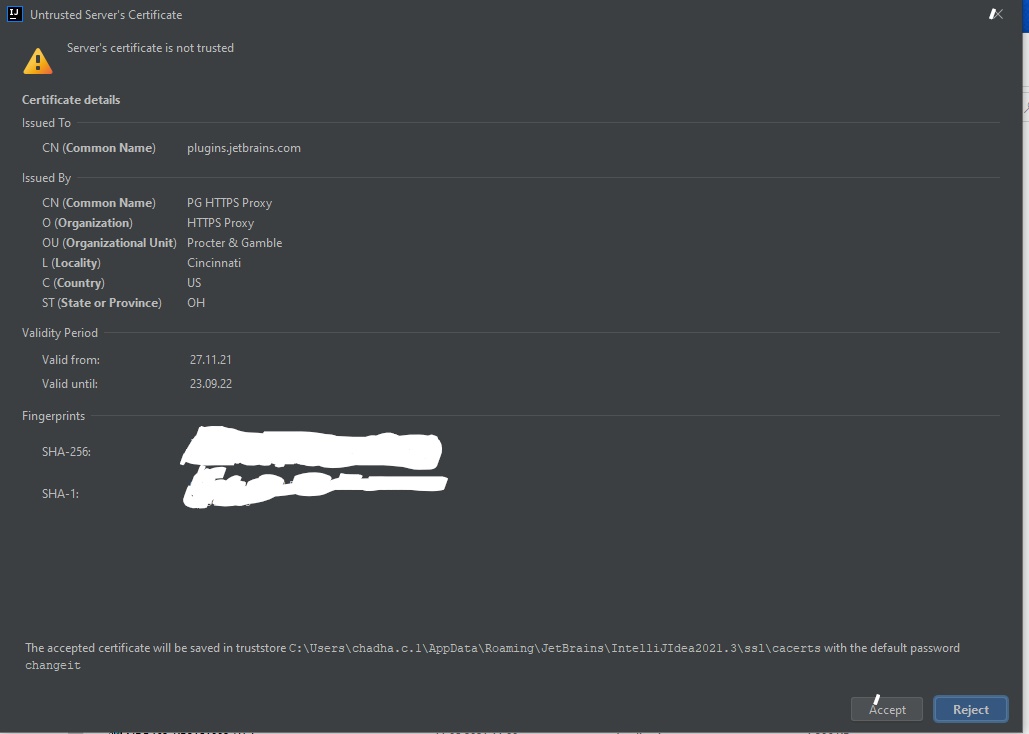
So I am trying to install IntelliJ IDEA (licensed version) but every single time it gets stuck at the welcome page. At the welcome page where it asks for the activation code, a window is popped out asking to accept the untrusted server's certificate. Once I accept, it is unable to verify my license. If I reject, it is unable to connect to the website. After googling a bit I found this link ( https://www.jetbrains.com/help/idea/settings-tools-server-certificates.html ) but I think it's only possible if the IDE has started. In my case, it is still at the welcome window. Attached is the window pop-up I am stuck at and the pop-up for accepting a certificate. If anyone has faced/resolved this issue please let me know

Best regards
Chetan Chadha
Please sign in to leave a comment.
I have been stuck on this issue for a while, really need to resolve it now
Hi Chetan,
Have you tried the 'JB Account' option?
What does it say in this case?
Once you accept the certificate, do you see it saved inside the truststore (path to folder displayed at the bottom of the Accept Cert screen)?
Hello Arina,
Yes I tried the 'JB Account' option it says authentication failed once I provide my login details
Ahm I checked by its a binary file, cannot verify if it adds or not?
Your corporate proxy seems to be hijacking the server's SSL certificate (original certificate is replaced with the proxy certificate so that the proxy can decrypt and analyze the secure traffic).
It is possible to add a trusted root CA so that all certificates issued by it are automatically accepted in future. If you have access to its file you can just import it as a normal certificate in Settings | Tools | Server Certificates - or to the corresponding trust store that is located at
${idea.system.path}/tasks/cacertswith the default JVM password.There is also a feature request in our system to make this process less of a pain in the future. Feel free to upvote it.