Adding python interpreter for docker compose.

Hey!
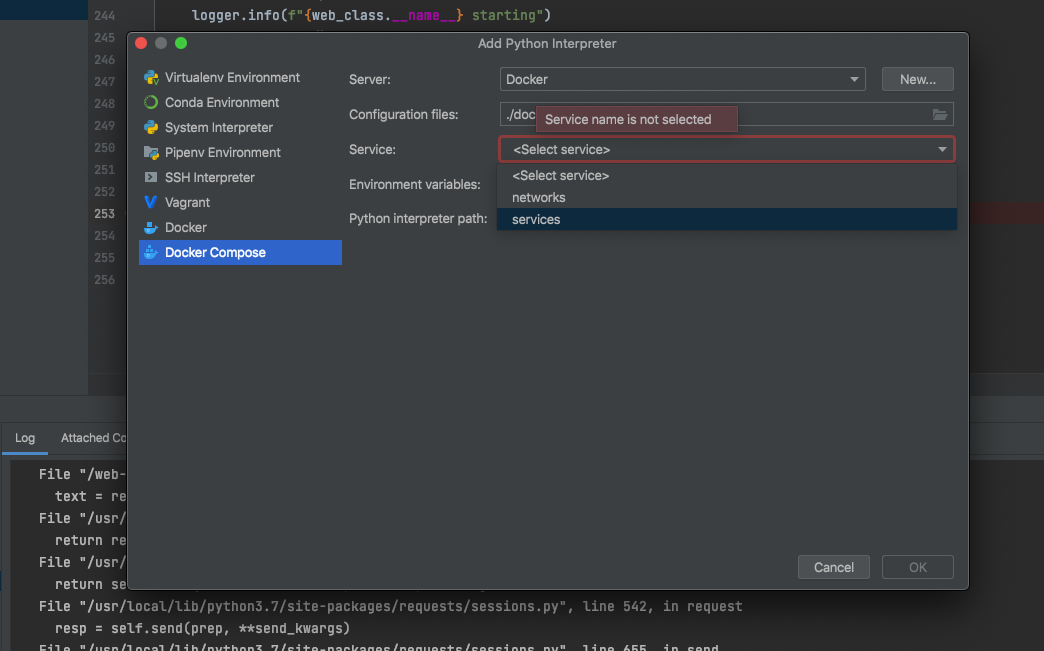
Im trying to add a new python interpreter using 'Add Python Interpreter' using docker-compose.yml file. I want to use the interpreter for debugging of the docker containers im running. Im using Tornado web server. The docker-compose file works fine when running build and run on terminal and I was able to debug it by attaching remote debuggers in VSCode, So I assumed that there is nothing wrong with the docker-compose file. When trying to add the interpreter on Pycharm I saw that in the 'Services' option I dont have the services but rather the option of either services or networks. Is there an issue with my docker-compose file, and also, is there a way to remotely attach a debugger with python? using pydevd_pycharm like in the Debug Configuration didnt work.
I added the file here to see if there any problems (some values are marked XXXX)
Thanks!
version: "3"
services:
  web-server-docker:
    ports:
      - 8000:8000
      - 5678:5678
    build:
      context: .
      dockerfile: Dockerfile.web
    volumes:
      - .:/web-server
      - /etc/chorus:/etc/chorus
    init: true
    networks:
      - chorus-network
  rabbitmq:
    image: rabbitmq:3.8-management-alpine
    environment:
      RABBITMQ_DEFAULT_USER: XXXX
      RABBITMQ_DEFAULT_PASS: XXXX
      RABBITMQ_DEFAULT_VHOST: XXXX
    restart: always
    volumes:
      - /etc/chorus:/etc/chorus
    ports:
      - 5672:5672
      - 15672:15672
    networks:
      - chorus-network
  redis:
    image: redis:latest
    restart: always
    ports:
      - 6379:6379
    volumes:
      - /etc/chorus:/etc/chorus
    networks:
      - chorus-network
  al_celery:
    build:
      context: .
      dockerfile: Dockerfile.celery
    restart: always
    init: true
    ports:
      - 5679:5679
    volumes:
      - .:/al_celery
      - /etc/chorus:/etc/chorus
    links:
      - redis
      - rabbitmq
    depends_on:
      - redis
      - rabbitmq
    networks:
      - chorus-network
networks:
  chorus-network:
    name: chorus-network

Please sign in to leave a comment.
Hi, which PyCharm version are you using? Does the issue reproduce in the latest version (https://www.jetbrains.com/pycharm/download/)?
Hey Andrey Resler
the issue was resolved after updating to the newest version of pycharm :)
Thanks