how to annotate code elements when they are opened in the editor?
Answered

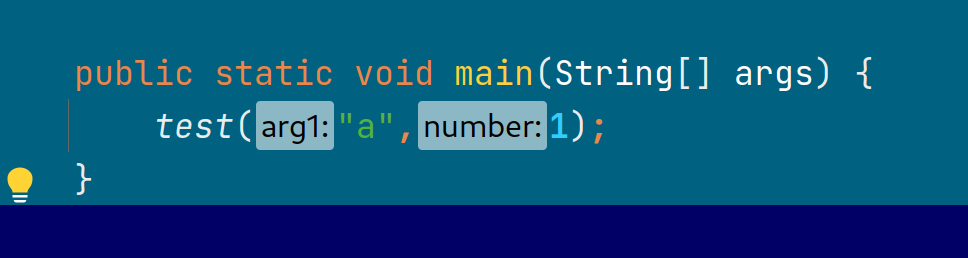
I'm writing a plugin that shows insights on code. i need to plant some annotations when the file is opened in editor. for example above some methods body. when i say annotate i mean to plant some text above the method, like in the picture bellow where idea adds the argument names in method calls. i want to plant something like that above the method body. i read about Annotator but it is only in the context of custom languages.
what is the way to do it for java/python files when they are opened in the editor?
Please sign in to leave a comment.
Hi,
These elements are called "inlays". Please take a look at a similar topic:
https://intellij-support.jetbrains.com/hc/en-us/community/posts/360001233699-Add-inlay-hint-above-method
Karol Lewandowski thanks for the response.
I would appreciate another hint, i also want to change or add the vertical indent guide when the mouse is on a code block, currently only on methods, i mean that:
Please clarify what do you exactly want to render here.
The vertical line that stretches from the method declaration line to the closing curly bracket , I believe its called "vertical indent guide" in intellij jargon. i would like to change its color and make it thicker when the cursor is on the methods declaration line.
That's not possible, unless you fully replicate in your plugin what com.intellij.codeInsight.daemon.impl.IndentsPass is doing and provide custom renderer similar to com.intellij.codeInsight.daemon.impl.IndentGuideRenderer
OK, Thanks. I will take a look but my guess is that its not trivial.
we want to somehow mark the current method code block where the cursor is, do you have a suggestion?
There's option "Current Scope" in Preferences | Editor | Code Editing that renders vertical bar on editor gutter.
Thank you. That's exactly what i need but to do it from a plugin ?
com.intellij.codeInsight.CodeInsightSettings#HIGHLIGHT_SCOPE