unwanted extra space around declarations
Answered

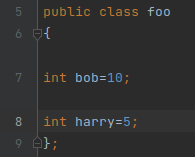
The newest IDEA build has me scratching my head. I'm embarrassed to admit despite going through all settings I cannot find a way to remove the extra space surrounding declaration statements. What do I change to remove the extra visual space between code lines 6+7 and 7+8? Thanks for any help.
Please sign in to leave a comment.
What is the version of IntelliJ IDEA? That should have been fixed in the latest EAP version of IntelliJ IDEA: https://www.jetbrains.com/idea/nextversion/
Build #IC-221.5080.210, built on April 11, 2022
Does it help to disable Code vision under "Settings | Editor | Inlay Hints"?
Thank you, yes! That did the trick. Sorry for the trouble.
I had the same thing too. I didn't realise it was to do with "code vision".
I think my code vision isn't working properly though, as it shows the space for code vision but nothing is ever there. (Actually, I saw a "2 usages" note at one point, but can't find that now.)
Is there a way of fixing code vision so it actually displays stuff?
I submitted a bug: https://youtrack.jetbrains.com/issue/IDEA-292064
Please vote and follow it to be notified once it is fixed
I've now re-enabled code vision and requested the insights to be displayed on the right. There are no longer unwanted spaces, but there are also no insights displayed!