Services tab and Finished job

Hi, There is some behaviour that I find quite exhausting on the services tab, and I'm quite not sure if it the desired one or if it can be changed in some way (while still using the services tab)
I work with Java+mvn, and to launch a mvn build, I use the maven tool window and the services tab. My project is a multi module project, let's assume this simple structure:
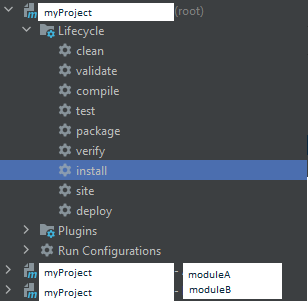
Reactor build is A then B.
If I launch an install job at root level, the running process is sent to the Services tab under the myproject [install] name.
Now, let's assume that the build has failed on module B, On services windows, I will see it kinda like this:
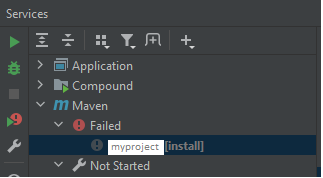
This is fine, and I can use the "Resume build from..." button to restart the build directly from module B, without having to manually launch mvn -rf :moduleB etc.
Now, let's say that moduleB fails due to an error in moduleA. I then fix the problem, and due to how my integration tests on moduleB are done, I need to recompile moduleA. If I launch an install on moduleA through the maven tool window, then previously failed install process (even though named differently) that I can resume later gets deleted and the running moduleA replaces it:
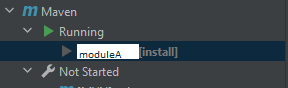
So I cannot quickly resume the whole build.
Without using the Services tab (so deleting the Maven group, process now spawn on Run tab), I can make it work by pinning the failed process so that it does not get overriden.
My whole point and question is: On the Services Tab, can you save/pin a finished/failed process?
Please sign in to leave a comment.
Do you run the permanent Run/Debug Configuration for Maven goals or you run the Maven goals from the Maven tool window without create a run configuration? If former - in Services tool window each run configuration will be displayed as a separate node:
In case of latter - such temporary runs are not saved as separate nodes. Looks like cases with Maven (or Gradle) launches like this are exceptions - i.e. all other launches cannot be made without explicitly created run configuration.
Please feel free to file a request to be able to pin the results like you describe.
Yep, it is indeed the latter, when running such goal, they are "on the fly" through the tool window, not fully configured run configuration.
Alright, I will probably file a request to be at least able to pin an result/running element