How expand component to fill height?
Answered

class LeftPanel: Panel {

    override fun createPanel(): DialogPanel {
        return panel {
            row() {
                cell(
                    JBScrollPane(
                        CheckBoxList<String>()
                            .apply {
                                setItems(mutableListOf<String>(
                                    "A", "B", "C", "D", "E", "F", "G", "H", "I", "J", "K"
                                ), null)
                            }
                    )
                )
                    .apply {
                        horizontalAlign(HorizontalAlign.FILL)
                        verticalAlign(VerticalAlign.FILL)
                    }
            }
        }
    }
}
Hi,
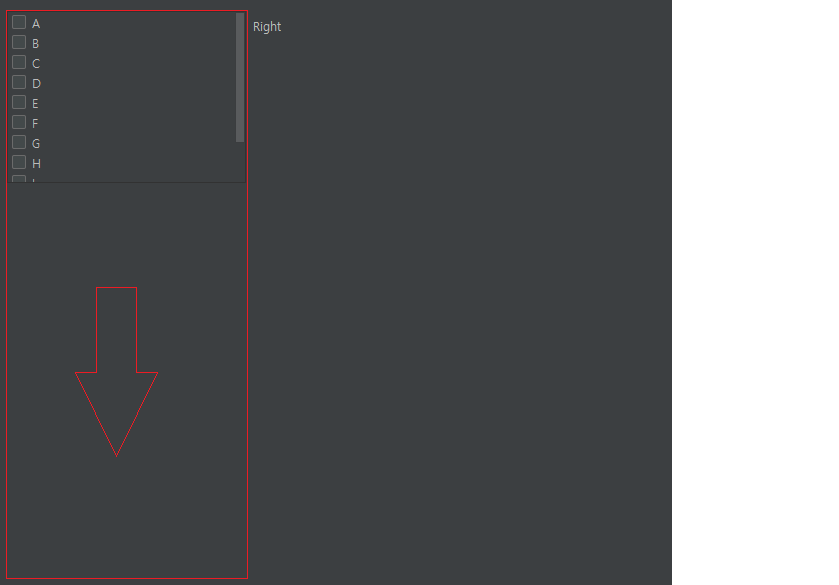
I want to resize the checkbox list like red box.
I tried using "verticalAlign(VerticalAlign.FILL)" for that, but doesn't work.
How expand component to fill height?
Please sign in to leave a comment.
Please try adding resizableRow() to allow the full row to adapt
panel {
    row {
      scrollCell(CheckBoxList<String>()
                   .apply {
                     setItems(mutableListOf<String>(
                       "A", "B", "C", "D", "E", "F", "G", "H", "I", "J", "K"
                     ), null)
                   }
      ).horizontalAlign(HorizontalAlign.FILL)
        .verticalAlign(VerticalAlign.FILL)
    }.resizableRow()
  }