Running filles in WebStorm with PnP

We've recently moved to PnP and I can no longer run files with `run` like before. The error I'm getting is that ts-node cannot be found.
Full error:
```
/Users/ilmoi/.nvm/versions/node/v16.14.0/bin/node /Users/ilmoi/Dropbox/crypto_bc/tensor/tensor-infra/yarn:etl/sol/package.json:ts-node/dist/bin.js /Users/ilmoi/Dropbox/crypto_bc/tensor/tensor-infra/shared/one_off/fix_composed_txs_doSwap.ts
node:internal/modules/cjs/loader:936
throw err;
^
Error: Cannot find module '/Users/ilmoi/Dropbox/crypto_bc/tensor/tensor-infra/yarn:etl/sol/package.json:ts-node/dist/bin.js'
at Function.Module._resolveFilename (node:internal/modules/cjs/loader:933:15)
at Function.Module._load (node:internal/modules/cjs/loader:778:27)
at Function.executeUserEntryPoint [as runMain] (node:internal/modules/run_main:77:12)
at node:internal/main/run_main_module:17:47 {
code: 'MODULE_NOT_FOUND',
requireStack: []
}
```
I'm sure there's some simple fix I'm just not sure where to look for it. Couldn't find anything on google, seems too WS specific.
Please sign in to leave a comment.
What Webstorm version is it, what does your run configuration look like? Do you have yarn selected as a package manager in Settings | Languages & Frameworks | Node.js?
Normally the IDE uses the following command to run scripts in Yarn PnP apps:
C:\Users\Elena.Pogorelova\AppData\Roaming\npm\yarn.cmd node --require ts-node/register -r tsconfig-paths/register C:\WebstormProjects\express_ts\app.ts
Express listening on http://localhost:8080
and everything works as expected
Webstorm 2022.3
Yep have yarn selected.
Configuration:
You are using a third-party plugin to run your app; please report a problem to the plugin vendor, https://github.com/bluelovers/idea-run-typescript/issues
For now, I'd suggest using Node.js run configuration with --require ts-node/register (as suggested in Running and debugging TypeScript) to run .ts files in Yarn PnP environment
yeah so now I'm getting
/Users/ilmoi/.nvm/versions/node/v16.14.0/bin/yarn node --require ts-node/register /Users/ilmoi/Dropbox/crypto_bc/tensor/tensor-infra/shared/one_off/fix_composed_txs_doSwap.ts
/Users/ilmoi/Dropbox/crypto_bc/tensor/tensor-infra/.pnp.cjs:34778
throw firstError;
^
Error: Your application tried to access ts-node, but it isn't declared in your dependencies; this makes the require call ambiguous and unsound.
Required package: ts-node (via "ts-node/register")
Required by: /Users/ilmoi/Dropbox/crypto_bc/tensor/tensor-infra/
Require stack:
- internal/preload
at Function.require$$0.Module._resolveFilename (/Users/ilmoi/Dropbox/crypto_bc/tensor/tensor-infra/.pnp.cjs:34777:13)
at Function.require$$0.Module._load (/Users/ilmoi/Dropbox/crypto_bc/tensor/tensor-infra/.pnp.cjs:34627:42)
at Module.require (node:internal/modules/cjs/loader:1005:19)
at Module._preloadModules (node:internal/modules/cjs/loader:1278:12)
at loadPreloadModules (node:internal/bootstrap/pre_execution:474:5)
at prepareMainThreadExecution (node:internal/bootstrap/pre_execution:77:3)
at node:internal/main/run_main_module:7:1
Process finished with exit code 1
Did you try adding ts-node to your project dependencies as suggested in the error message?
yup it's already listed in the dependencies for this project, which is why I was confused by the message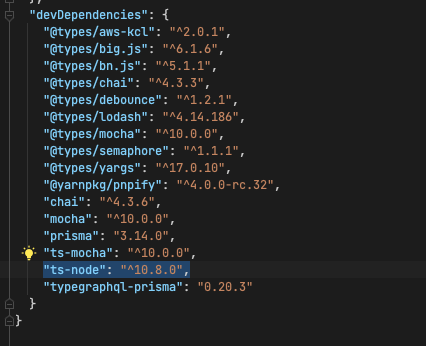
or is there some other dependencies file where it should be listed?
Not sure... did you try adding typescript to the list? It works for me with
ok so I think I figured out the issue - we had a layered repo with sub-package.jsons and ts-node wasn't installed in the very top (root) one.
Next question - how do I make node.js be the default run config for .ts files? I found this question but the answer there isn't helpful - I can edit the template but by default on run TypeScript runs, not node.
There is noway to do this, the IDE doesn't support running ts files directly (i.e. you can't run it from the file right-click menu)
You can try the suggestions from https://youtrack.jetbrains.com/issue/WEB-31667/Support-direct-run-ts-file-in-webstorm#focus=Comments-27-3726550.0-0