A problem that does not build when using "Makr as Excluded" in "Project Structure"
Answered

Hi
Please understand that I am using a translator due to my lack of English skills.
I have a scenario like below.
1. Create new project by Spring Initializer.
- Language : java
- Type : Maven
- JDK : temurin-17
- Java 17
- Packaging : Jar

2. Select Spring Boot 3.0.0 and Spring Web

3. Run Configuration DemoApplication


4. Create samples directory and Mark as Excluded


5. Rerun DemoApplication. than you can find the ClassNotFoundException.
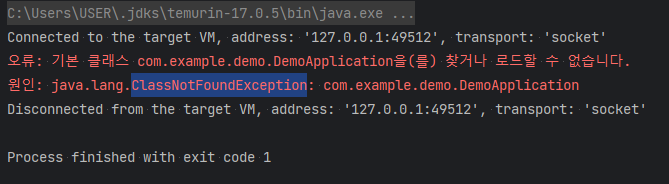
I know "Mark as" shouldn't affect build, so why is this happening?
This is my environment.
- OS : Windows 10
- Intellij : 2022.3 (Ultimate Edition) IU-223.7571.182

Please sign in to leave a comment.
Unfortunately, I wasn't able to reproduce a problem following provided description.
Could you please share your sample project via JetBrains Uploads and post the ID you receive here?
Uploaded the demo project to "2022_12_20_XANxtJ9hsHhQCqMLChWEbY".
Looks like your problem isn't about the samples directory - the error appears if it is marked as excluded and if not too.
The error occurs because there is no
DemoApplication.classfile in the~/target/classes/directory. To fix it you can perform the compile action in the Maven tool window (for this particular case):or check the Delegate IDE build/run actions to Maven checkbox in the
IntelliJIDEA/File | Settings | Build,Execution, Deployment | Build Tools | Maven | Runnerwindow: