Enhance existing language

I'm thinking of making a plugin to implement highlighting and syntax hints for a new css frameworks in frontend development, this is an engine similar to Tailwind CSS called UnoCSS.
I currently want to achieve the following functionality:
1. Highlight the css class and add an underline for it:
2. When hovering over the css class, the corresponding actual css code can be displayed
Example: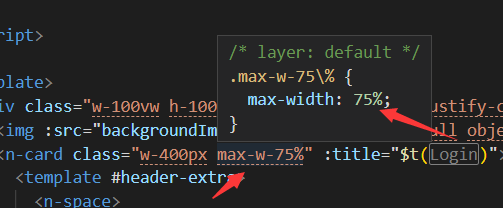
So I'd like some general guidance:
1. First I need to check if the css engine is enabled for the project, so I need to scan different build configuration files (vite.config.js/nuxt.js/...), if unocss is detected, then provide the project with various functions.
2. For the highlight, I tried `com.intellij.lang.annotation.Annotator`, but I don't quite understand how to customize the highlight (such as adding an underline), and display the specific css class represented when hovering css code, which may need to call unocss api since it's dynamic
Can some direction be given like which APIs should I use
Thank you very much
Please sign in to leave a comment.
Hi,
Regarding 2., there are two separate features:
com.intellij.lang.documentation.DocumentationProvider, which shows element documentation in a popup on mouse hover or invoked by a shortcut. I’m not sure if your use case qualifies as documentation or its part, but implementing a custom mechanism triggered on hover is not an option, as it would collide with the existing editor feature. An alternative could be implementingcom.intellij.codeInsight.hint.ImplementationViewSessionFactory, which is a part of the “Quick Definition” action/mechanism.Regarding 1, I asked my colleague to answer.
Regarding 1, you can only determine if a node package is installed like this:
  public static boolean isUnoCssInstalled(Project project, VirtualFile context) {
    VirtualFile packageJson = PackageJsonUtil.findUpPackageJson(context);
    if (packageJson == null) return false;

    InstalledPackageVersion unocssPackage = new NodeInstalledPackageFinder(project, packageJson)
      .findInstalledPackage("unocss"); // if unocss is a valid name
    return unocssPackage != null;
  }
I got it done, now I wonder if there is some way to execute Javascript? so that I can call unocss API for code completion and highlighting
Hi,
Please take a look at https://github.com/JetBrains/intellij-plugins/blob/master/AngularJS/src/org/angular2/cli/SchematicsLoader.kt