Can't set a ruby interpreter
已回答


I select Configure Ruby Interpreter
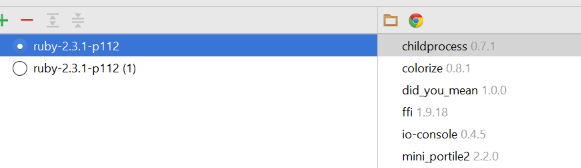 I select the version I want, Apply un-greys but doesn't do anything and clicking ok makes the window vanish, but doesn't assign the Interpreter, going back in to preferences the version I'd selected is unchecked.
The error log contains nothing.
请先登录再写评论。
Could you please attach idea.log (Help | Show log in...) and just in case if you have multiple projects, check that you select SDK for all of them.
I solved it, but I had to open a different directory, then re-open the one with the project in and it let me add an interpreter
Having this problem with RubyMine 2020.1.1
idea.log linked here https://pastebin.com/Ru2qic8e
@..., could you please provide more details? What kind of Ruby SDK you're trying to set? A screenshot would be also great.
I have the same problem .. Here is the screenshot

I am wondering if the following is the cause.
I have a lot of projects in which I use Ruby/Rakefile to govern the builds, such as creating Docker files, doing various AWS actions, etc.
There is no support for this at all in any of the JetBrains IDEs.
So, when using PyCharm, CLion, IntelliJ Deluxe, the editing, highlighting, and interpretation of Ruby/Rakefile is non-existent.
As a result, I usually have 2 IDEs open at the same time. For example, PyCharm to edit the python based project, but I also open up RubyMine so I can edit the damn Rakefile.
That's just the way I have to work.
Since the IntelliJ family of IDEs operate from a single ".idea/" directory for state and configuration, the IDEs get confused.
I have verified this situation.
If I open PyCharm to edit a python project (gak! I hate python, it's kid's language), and then I open up RubyMine to edit the Rakefile, I cannot set the Ruby interpreter on RubyMine, no matter how hard I try.
However, if I close PyCharm, remove the .idea/ directory (well, I moved it to .idea-pycharm), then open the project directory in RubyMine, all is good. It finds my local /usr/bin/ruby interpreter, and I can edit the file and get all the Ruby bells and whistles of RubyMine.
I wonder if there is a way to specify the config (".idea/" ) directory for each IDE, so two can operate in parallel on a single project directory?
For example, something like
/snap/bin/rubymine --config-dirname .idea-rm projectdir
/snap/bin/pycharm --config-dirname .idea-pycharm projectdir
@..., at the moment it's not possible but it'd be great if you could submit your request as a feature one directly on our platform tracker:
https://youtrack.jetbrains.com/issues/IDEA