Database icon disappeared.

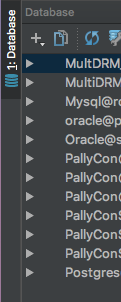
As you can see, the icon disappears from the Database menu.
I did not find an option to change that setting, so I made it explicit, but it's not as intuitive as before.
If you know how to get the icons back, can you guide me?
Thanks.
请先登录再写评论。
Hi! Is it the latest version?
That is correct. Always keep the latest version through toolbox.
I've fixed the issue. If power save mode was enabled, you did not know that the icon was not visible.
Wow that's interesting! But yes, it works like this as I investigated, because it depends on resolving.