Setup Clion on Mac after removing Xcode

So far with helps from friends, I have managed to compile source codes written in C++ and test basic stuffs using the IDE.
Following is what is in my CMakeLists.txt every time I create a new project using C++ Executables.
cmake_minimum_required(VERSION 3.8)
project(untitled)

set(CMAKE_CXX_STANDARD 11)

set(SOURCE_FILES main.cpp)
add_executable(untitled ${SOURCE_FILES})
So the issue I have is with the project I used to work on before I removed Xcode manually.
As seen, I still have Command Line Tools.

So when I created a new project, I experienced no issue in compiling what I wanted. And the auto-generated CMakeLists.txt file contained the same content as with any previous project.
Below is the specific error message I received, and which I want to ask your advise on:
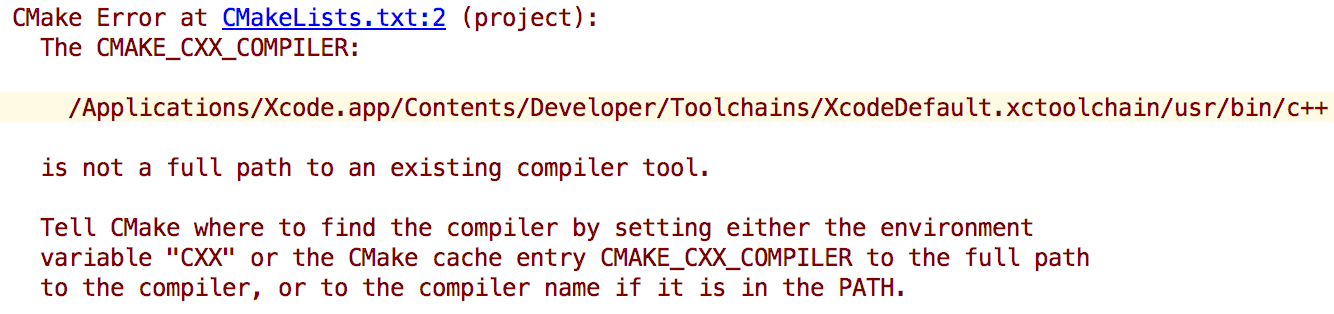
I really want to understand the issues and troubleshoot on my own in the future.
Any input will be appreciated. Thanks in advance!
请先登录再写评论。
Hi! CMake can't find the compilers. Please go to File | Settings | Build, Execution, Deployment | Toolchains and specify the appropriate paths to the C and C++ compilers on your machine. Reload the CMake project after that (Tools | CMake | Reset Cache and Reload Project). Does it help?
Hi! Thanks so much for the reply.
I did find Build Execution Deployment under Default Settings but I dont have Toolchains option. only saw python debugger/python interpreter/deployment/console.
Is this a matter of version..?
But i just followed second direction of yours and it works!
Awesome. Thank you so much.
Jac0786ky, Toolchains option is not under File | Default Settings | Build, Execution, Deployment, but under File | Settings | Build, Execution, Deployment which in case of macOS means Preferences | Build, Execution, Deployment. Sorry for the misleading answer. Anyway, I'm glad it helped!