How to disable the automatic function creation that came in version 2023.3?

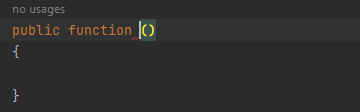
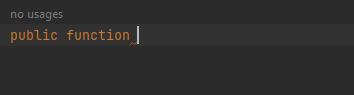
In version 2023.2 of PhpStorm, when creating a method for a PHP class, if I typed 'public function,' it would simply prompt me to complete the rest and only fill in the curly braces. However, after updating to 2023.3, when I type 'public function' and autocomplete 'function,' it adds '() {}' and leaves the cursor to enter the function name. This forces me to use the mouse or arrow keys to navigate to the function arguments, which honestly annoys me a lot. Haha. I wanted to disable this behavior, but it seems unrelated to live templates. The only template I found is 'func,' but it allows me to enter function arguments, unlike the autocomplete behavior I described.
2023.3
2023.2.4

请先登录再写评论。
Hi,
I will quote my reply from the related YouTrack issue here just in case someone else is interested:
Here is the original request for this new feature ("natural" live templates): WI-49048
Unfortunately, there is no way to disable them, however, if I got your concern correctly, WI-74593 implementation should mitigate this feature downsides.
As a sort of a workaround, you may want to use a currently available
pubflive template as "tab" already works fine there for moving to arguments/body.I have the same problem, when I finally updated to 2023.3.5 thinking that all the problems were solved, another annoying one appeared so I went back to the 2022 version which works quickly and without any strange problems
in the new version, even when clicking on the cs-fixer config, it takes a few seconds to think before it allows you to enter the menu... it's a pity
Hi Modo ,
Could you please describe this new issue in detail? Providing a screencast and IDE logs from Help | Collect Logs and Diagnostic Data will also help to narrow down the root cause.
You may want to submit a ticket directly from the IDE via Help > Contact Support... or a YouTrack report with the requested details.