Bullet Points in a 'NOTE:' section
已回答

Hi everyone,
I work in a documentation team for a SAAS company and I have a question on how to populate the ‘NOTE:’ section
Here is an example of what I've come up with so far - not very happy of the results tbh

And this is an idea of how I would like my text to look like, ideally. The ‘NOTE’ vertical line extended (here in orange), and the bullet points aligned with the NOTE text, same for the extra text at the bottom. And I guess the whole text would be grayed. 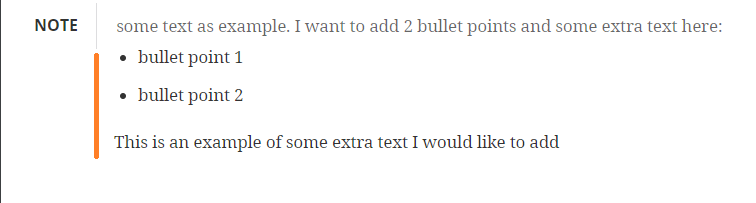
How can I prompt the text so that I can get the right formatting under the NOTE: section? Hope my question is clear, thank you in advance!
请先登录再写评论。
Are you working with Markdown? Is your question about Markdown or IntelliJ IDEA product?
Hi Serge, I work on IntelliJ IDEA. Apologies, I thought I've added this detail but clearly not
Do you edit a Markdown file type?
You may need to look the appropriate syntax for the formatting you need https://www.markdownguide.org/extended-syntax/.
It should be IDE agnostic.
Hi again, yes generally we work on the markdown file type in IntelliJ (left of the screen) and check how it is rendered (right side of the screen in the screenshot I provided).
Thank you for the useful link, but unfortunately it doesn't cover the case scenario I'm looking for
If Markdown doesn't have the formatting you need, there is nothing we can do about it. It's the limitation of the markup language you are using, not the IDE.
thanks, Serge. Do you know if there is a different feature/formatting that could be used to have the same rendering? Kind of a work around instead of the NOTE: section. Thanks!
You can probably do it with tables.