Fetch deletes my deployment (and other) settings

Hiya,
I'm using the latest version of PHPStorm.
Lately, for the life of me, I couldn't figure out why my deployment settings kept getting deleted. I use a dedicated development server and I work from different locations on different computers (hence the online development server).
I just now figured out that every time I update my project through PHPStorm's git options, it deletes my deployment settings.
Is there any way I can prevent all of this from happening? I very much prefer to keep my PHPStorm settings seperated on seperate computers.
I don't feel like the .idea folder has any place in my repo's, so those are added to ignore by default. I feel like this may be related to why my fetches delete my deployment settings? I switch between computers about 3-4 times a day, so I could really use some pointers. Thanks!
For more information;
Whenever I switch PC's, I first use “Fetch” to pull in the branches, then I use “Update Project” to get the changes.
I'm starting to wonder whether that's where my mistake is? Should I right-click in the explorer and use “Pull” specifically?
If so, why isn't “Pull” an option in the git quick-buttons, top-left of the screen?
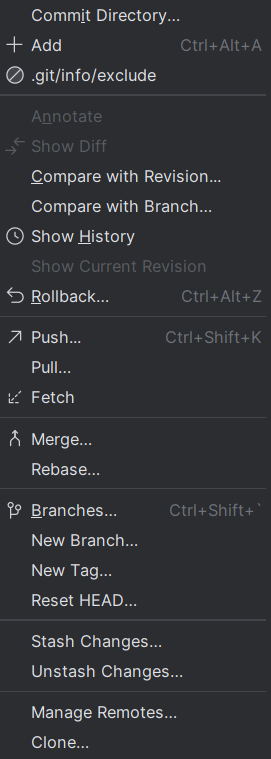
— Added some screenshots for clarity. What is it that “Update project” does, exactly? And why isn't the “Pull” option in the quick-button for git? Seems to me like it's a very basic must, no? I'm confused as to why the git options are so extremely different in what they do, when they're both git options. And then there's the dedicated commit tab which is very different again. Why is this all so different and not more streamlined? It's honestly quite confusing.

请先登录再写评论。
Hi,
Please clarify the following:
1. Are these deployment settings global or ‘Visible only for this project’?
2. Is the project by any chance stored in OneDrive?
Also, please reproduce the issue and collect logs from Help | Collect Logs and Diagnostic Data. Logs can be uploaded here: https://uploads.jetbrains.com/.
As for the ‘Update project’ option, this is equivalent to ‘git pull’. Please see https://www.jetbrains.com/help/phpstorm/sync-with-a-remote-repository.html#update for details.
Dear Anastasiia,
After some rigorous testing it seems this problem is unique to my home PC. My home PC also suffers from some other bugs my laptop does not seem to suffer from (Like PHPStorm freezing on copy-paste actions, which was a known bug which should've been fixed but wasn't for my PC, works fine on laptop).
As per your questions;
1 ) The deployment settings are, I believe, only visible for the project. I set these seperately on every computer I work with.
2 ) The projects are stored in git, but the working directory is local.
3 ) I'd rather not upload logs unless really necessary.
For now, I will be sure to reinstall PHPStorm on my PC. I'll be sure to report back whether or not that fixes it. It would seem the PHPStorm on my PC has more than one issue, including not wanting to connect to certain FTP's, so I'll just give it a shot.