JavaScript inspection warns about unknown property, which actually is available (ES2020+)

Question:
Is there a way to tell PhpStorm which ECMAScript version to use for its inspections?
Issue:
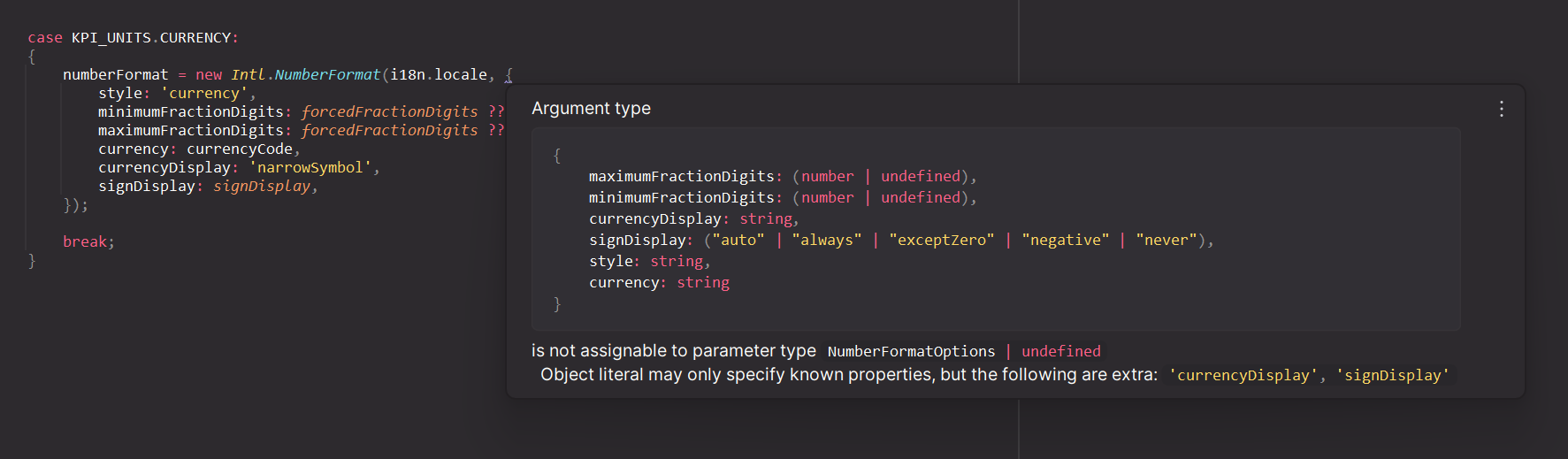
When using Intl.NumberFormat the options currencyDisplay and signDisplay are available as options (from ES2020 onward), but PhpStorm does not know about them.
“Go To → Declaration” on Intl.NumberFormat reveals the interface definition in lib.es5.d.ts. The extended definition in lib.es2020.intl.d.ts (which does contain the mentioned options) is not being parsed.
See also:
- https://developer.mozilla.org/en-US/docs/Web/JavaScript/Reference/Global_Objects/Intl/NumberFormat/NumberFormat#currencydisplay
- https://developer.mozilla.org/en-US/docs/Web/JavaScript/Reference/Global_Objects/Intl/NumberFormat/NumberFormat#signdisplay
- https://github.com/microsoft/TypeScript/blob/main/src/lib/es5.d.ts#L4439-L4450
- https://github.com/microsoft/TypeScript/blob/main/src/lib/es2020.intl.d.ts#L243-L251
Steps to reproduce:
-
Put this code into a JavaScript file:
new Intl.NumberFormat('en', { style: 'currency', currency: 'USD', currencyDisplay: 'narrowSymbol', signDisplay: 'auto', }); - Look at inspections for the second parameter.
Things I've tried:
- Find a way of choosing the ECMAScript Version in PhpStorm's settings - no luck.
- Add all
*.d.tsfiles fromPhpStorm/plugins/javascript-plugin/jsLanguageServicesImpl/external/to a new custom Library in “Settings → Lanaguages & Frameworks → JavaScript → Libraries”. -
Create a
tsconfig.jsonfile to my project and add this config:{ "compilerOptions": { "target": "esnext", "lib": [ "es2015", "dom", "es2017", "es2020", "esnext" ] } }
Screenshot:
请先登录再写评论。
Unfortunately I failed to reproduce the issue.
Can you please share a bit more context around the problem? Which version of the IDE are you using? Can you repeat the issue in a brand new project?
Thanks for your reply, Elena!
The issue is also reproducible in a brand new project for me.
I can see in your screenshot that the
{at the end of line 1 does have a squiggly underline as well. Could you try hovering over it and see if the same warning appears?Thank you for bringing this to my attention. I apologize for the oversight. The issue you mentioned is reproducible in version 2024.1.5, but it seems to be resolved in version 2024.2 RC. Could you please verify if the problem still occurs after upgrading?
I installed 2024.2 RC, and the warning is indeed not showing anymore in my original project. However, I am still getting warned about the very same issue in the newly created project.
After some testing it seems that
does work as intended in 2024.2 RC. In my original project I had added those, in the newly created project the files were not loaded.
IMO, this still feels like an "odd" workaround. I think it shouldn't be necessary to add all those libraries manually in PhpStorm's settings, just to get rid of warnings for newer JavaScript features. These features have been there since ECMAScript 2020…
What is the intended way of enabling JavaScript features that are newer than ES5?