Upgrade Package Failed
已回答

I have PyCharm Community Edition 2016.2.3 on Windows, the latest version. It's been working great, but something just broke and I can't seem to fix it.
When I go to File / Settings / Project Interpreter and try to either upgrade or install a new package, I get the following error:
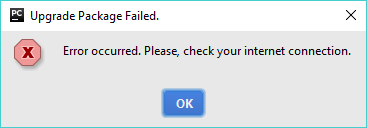
My Internet connection is fine. This started happening shortly after I deleted a couple non-existent Project Interpreters by clicking the gear next to the Project Interpreter: text box, More, and Remove, and it may have something to do with that. I have tried rebooting and re-installing PyCharm. I have tried selecting different interpreters among my system interpreter and a virtual environment, with the same results.
I'm stumped. Any advice?
请先登录再写评论。
Please, check the problem with the latest PyCharm 2016.3. Does the update help? If no, please, file this issue to PyCharm issue tracker: https://youtrack.jetbrains.com/issues/PY and attach screenshots that show the problem with idea.log (https://intellij-support.jetbrains.com/hc/en-us/articles/207241085-Locating-IDE-log-files), thank you.
I just re-installed this version:
PyCharm Community Edition 2016.2.3
Build #PC-162.1967.10, built on September 7, 2016
JRE: 1.8.0_112-release-b343 x86
JVM: OpenJDK Server VM by JetBrains s.r.o
a few days ago when this problem occurred. I assume that's the latest? I will log the problem as you describe.