Can't create new Objective-C class

I can't create new Objective-C class in my AppCode 3.1.
This is how I create a new class:
It shows mesage like this:
Velocity Error
Error pasing file template: Unable to find resource 'Objective-C File Header.m'
My XCode version is 6.1.1
My MacOSX is 10.10.1
Anyone help?
请先登录再写评论。
If you select "Edit File Templates..." from the context menu (see screen below), what do you see in the file template list?
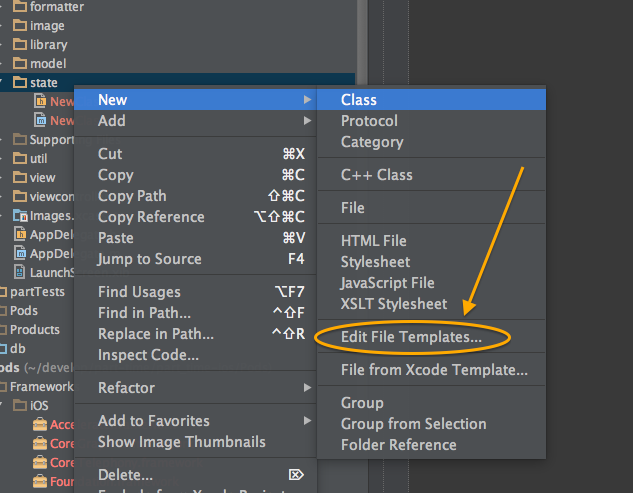
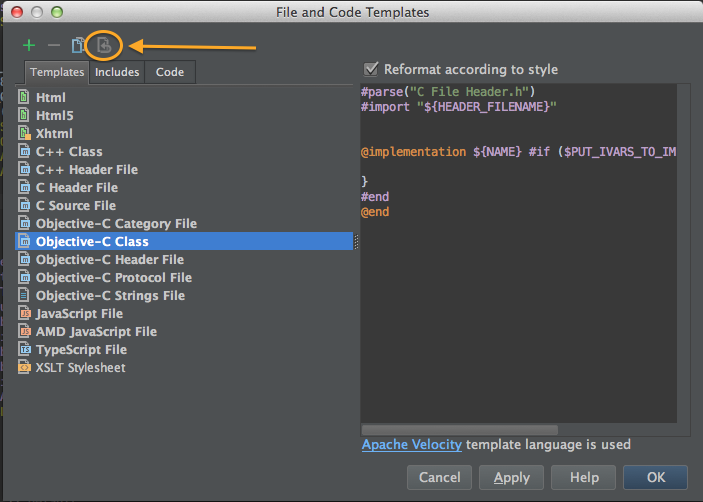
Here's what I see. If you have a corrupted or modified (or empty) version of the Objective-C class file template, you can try hitting the revert button (circled below).
If that isn't possible or doesn't fix the issue, then you might want to try redownloading / reinstalling AppCode, since those templates are packaged in with the app bundle AFAIK.
Thanks Daniel, It works!!
I found that I edited my templates in previous version of AppCode, when I revert it to default state everything is ok!
Daniel,
Thanks for the reply, that solved the same problem I just had.
For what it's worth, it appears my templates were edited by changing the style preferences in AppCode. I'm not sure if this consistently leads to a bug during refactoring.
Jason