AppCode 1.5.6 consuming a significant amount of CPU. Is there anything I can do?

Frequently just with the editor open with my default project I am seeing the CPU well above 300% and the fan running at full speed. I selected Help earlier today to search for this and it spun up above 500% and became "Not Responding" according to Activity Monitor. I was able to capture this screenshot when it mellowed out and was no longer (Not Responding). Is there an application setting I need to change or setting to the JVM?
My system is running Lion (10.7.4) on a MacBook Pro (2.4 GHz Intel Core i7) with 8GB RAM.
Cheers,
Scott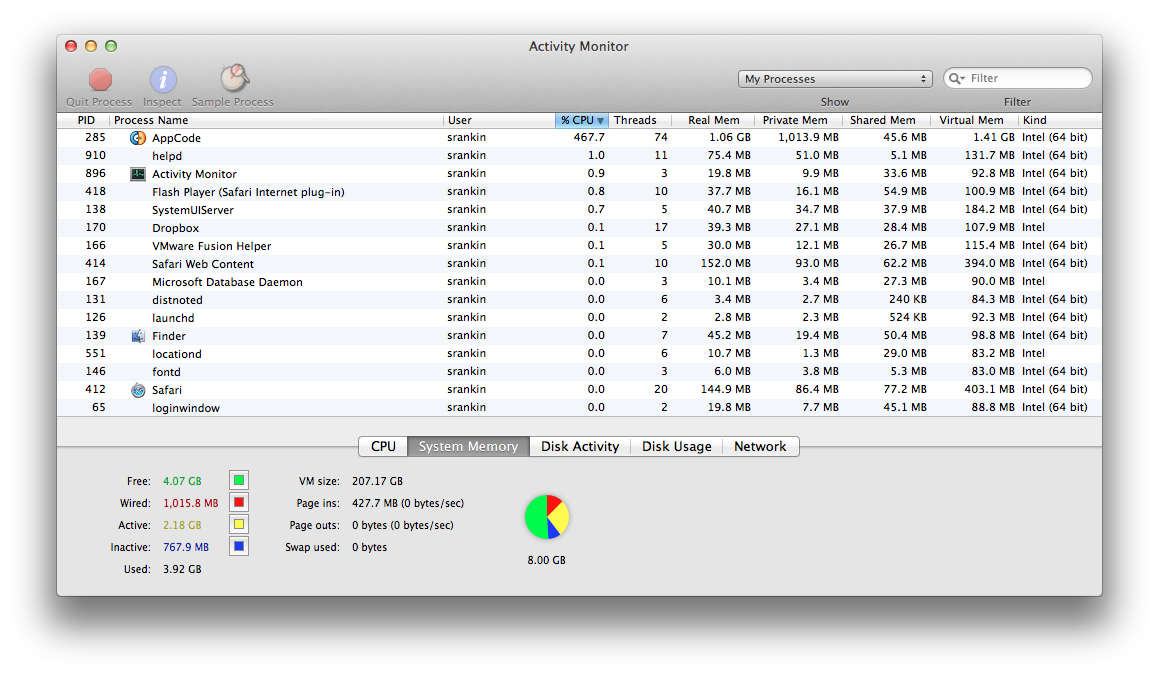
请先登录再写评论。
Scott,
if you have already captured JVM CPU snapshot, please send it to us. If not, here are instructions on how to do that: www.jetbrains.net/devnet/docs/1087.
But first, try File->Invalidate Caches, restart AppCode and see if the problem recurs. If it is, send us zipped log directory (AppCode->Help->Reveal Log in Finder).
To send the logs/cpu, please create the issue here: http://youtrack.jetbrains.com/issues/OC#newissue=yes and attach the files to it.