Error during EJB.ear artifact deployment to Glassfish 3.1.2 Application Server from within IntelliJ Idea 14

I am getting this error during EJB.ear artifact deployment to Glassfish 3.1.2 Application Server from within IntelliJ Idea 14.0.3
Connected to server
[2015-09-04 10:13:21,527] Artifact MyAppEar:ear: Error during artifact deployment. See server log for details.
[2015-09-04 10:13:21,528] Artifact MyAppEar:ear: java.io.IOException: com.sun.enterprise.admin.remote.RemoteFailureException: Error occurred during deployment: Exception while deploying the app [MyAppEar] : Invalid ejb jar [MyAppEjb-3.2.0.jar]: it contains zero ejb.
Note:
1. A valid ejb jar requires at least one session, entity (1.x/2.x style), or message-driven bean.
2. EJB3+ entity beans (@Entity) are POJOs and please package them as library jar.
3. If the jar file contains valid EJBs which are annotated with EJB component level annotations (@Stateless, @Stateful, @MessageDriven, @Singleton), please check server.log to see whether the annotations were processed properly.. Please see server.log for more details.
The order of deployment also matters as it is MyAppEar.ear and then other 2 wars dependent on it.
I am able to deploy the EJB.ear, and the other war files successfully externally via Glassfish Admin console.
I have to check the compatibility check-box while deployment from Glassfish Admin console.
See attached screenshot below and then it installs successfully.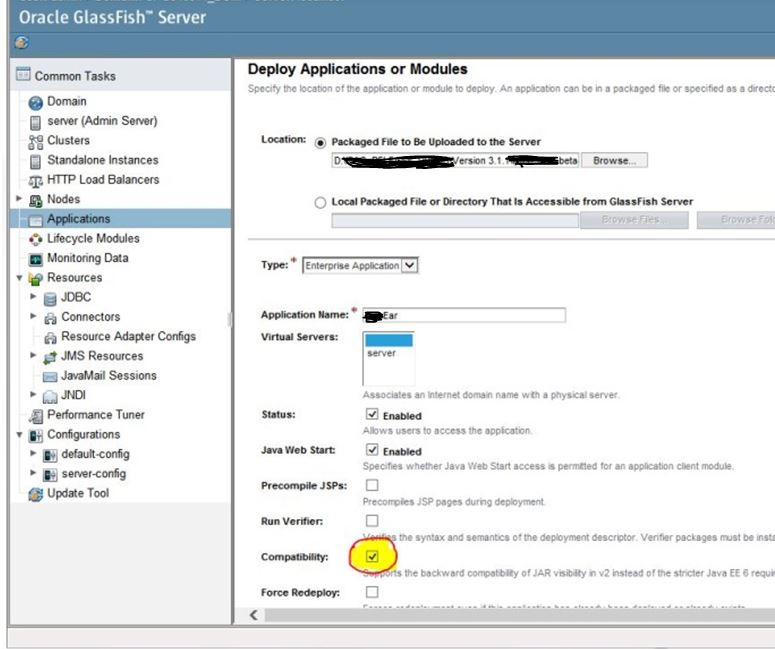
How to achieve this same compatibility check for EAR deployment from within IntelliJ Idea ?
Please help!
请先登录再写评论。
Hello
It seems like a https://youtrack.jetbrains.com/issue/IDEA-137202 which is fixed now and should be available in next IDEA 15 EAP.
HTH