IDEA 8M1 plugin issue

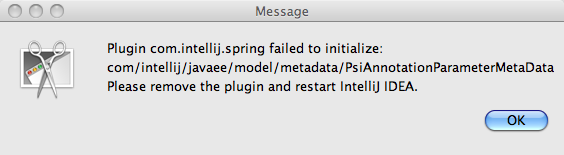
I just installed the 8M1 build, and I'm unable to start IDEA now. The error message is attached.
The real problem is that I can't figure out how to remove the Spring plugin, as directed. I can't seem to find the directory where IDEA stores its plugins. I was thinking it was ~/Library/ApplicationSupport/IntellijIDEA80, but that directory doesn't exist. Anyone know how I can remove the plugin?
I think the root cause of the error is that I enabled some of the Spring plugins, but disabled the Java EE plugin. I thought I didn't have any missed dependencies, but I guess I missed one.
Tobin
Attachment(s):
error.png
请先登录再写评论。
On Linux, I would suspect you should look in your user directory under ~/.IntelliJIDEA80/config/plugins
Hello Tobin,
This is in fact a bug in IntelliJ IDEA. The best workaround for this is to
delete ~/Library/Preferences/IntelliJIDEA80/disabled_plugins.txt so all plugins
will be re-enabled. Unfortunately you'll have to keep the Java EE plugin
enabled if you use the feautres provided by the Spring plugin.
--
Dmitry Jemerov
Development Lead
JetBrains, Inc.
http://www.jetbrains.com/
"Develop with Pleasure!"
Sorry, should have specified I'm on OS X.
Tobin
Awesome, that worked. Thanks Dmitry.
Tobin