7065: Unable to "Edit" Project JDK

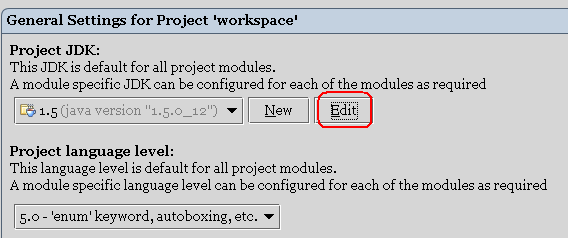
Build 7065, jdk1.6.0_01, WinXP SP2; Settings -> Project Settings -> General -> Project JDK -> "Edit" (see the screenshot attached). Clicking the button has no effect ...
Attachment(s):
1.PNG
请先登录再写评论。
Same here with 7065 on JDK 1.5. Not even an exception or log output.
There's a workaround though: You can instead edit JDKs in the "Platform Settings" category when you have "Project Settings" selected.
Thanks ! Looks like the button has no listener attached .. Checked the log as well - nothing.
Yup, same here. 'Edit' button does nothing.
Hello Evgeny,
http://www.jetbrains.net/jira/browse/IDEA-13543
http://www.jetbrains.net/jira/browse/IDEADEV-18677
Alexander.