Skip a single warning

I'm rather new to Intellij Idea and I have a question, that I've nowhere found an answer. Can I skip a SINGLE warning? I mean, can I make IDE not to highlight a line with yellow, without turning off the inspection rule, which considers this code construction suspicious. Let me explain the situation with one class of my AS3 code:
public class GraphInitiator extends Command {
[Inject]
public var ev:InitGraphEvent;
override public function execute():void {
var f:Function = this[ev.body.f];
f();
}
//===========================
private function InitUserPanel:void { // Unused method warning
// Some code
}
//===========================
private function InitInfoPanel():void { // Unused method warning
// Some code
}
//===========================
}
Functions InitUserPanel and InitInfoPanel considered by IDE as unused, as they never called directly. So I'd like to skip this 2 warnings (like in Microsoft Word with green highlighted constructions) without turning "Unused method" inspection off. Is it possible?
Sorry for clumsy english.
请先登录再写评论。
Yes, it is possible:
![]()
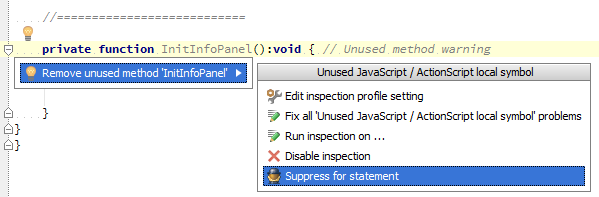
Just in case it is not clear to the original poster, you can access the pop-up menu that Alexander shows by putting your cursor on the warning text and either clicking on the yellow light bulb icon, or typing Alt+Enter.
Thanks