Groovy documentation not showing properly

Hello everyone,
for the past hour or so I have been trying to get IntelliJ to properly display groovy documentation.
The case is simple. I create totally new project (from scratch, with Groovy selected as desired technology) and a single groovy file with this code:
"AB".each {}
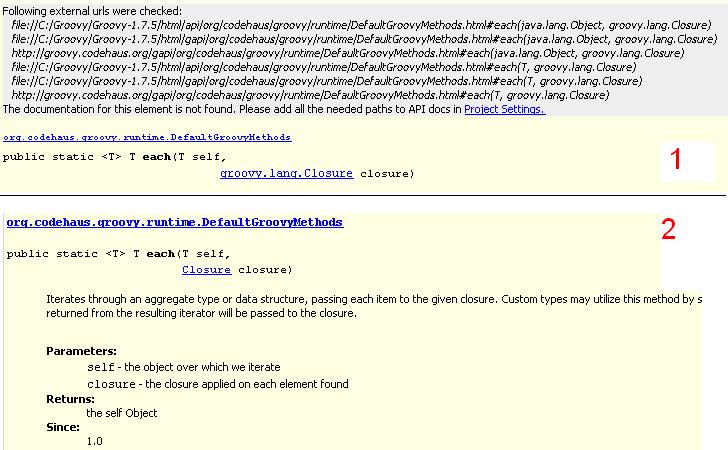
When I press ctrl+q while having the "each" selected, I only get the method body, but no added documentation. See picture 1.
If go to the code declaration of the "each", by pressing ctrl+space, and press ctrl+q there, I do get the full documentation of this method. See picture 2.
When I look at the source of the documentation, by pressing the little upward arrow in the documentation popup, the file location is contained in those show in picture 1.
I am using windows XP, java jdk1.5.0_13, groovy 1.7.5 and IntelliJ 9.0.4 (this problem also occured in 9.0.3).
I have installed groovy in c:\Groovy\Groovy-1.7.5.
In IntelliJ I have added a Groovy Global Library (in Project Structure). In this I have added the 3 html subfolders (api, gapi and groovy-jdk) and the online api as documentation and the lib folder as a jar directory.
Is there something simple I am missing or is this some kind of strange bug?
Thank you in advance.
Attachment(s):
GroovyDocProblem.JPG
请先登录再写评论。