Javascript Structure Issue

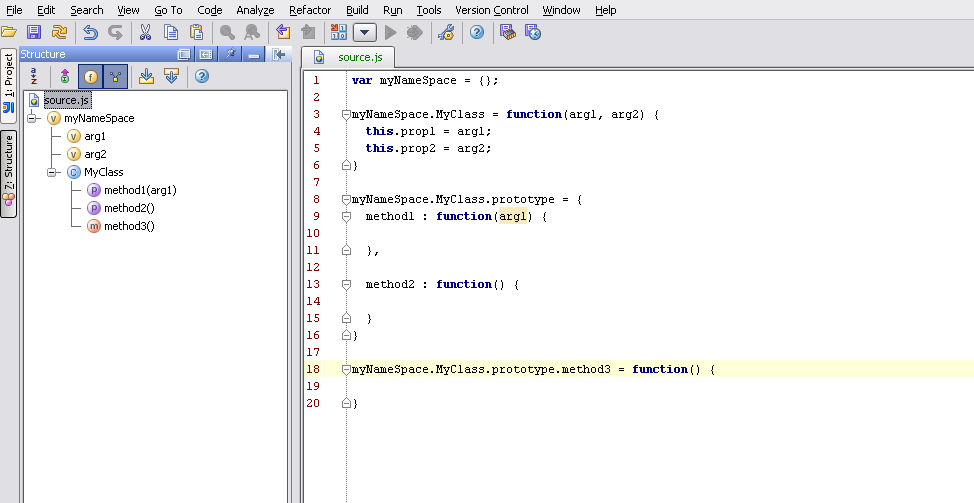
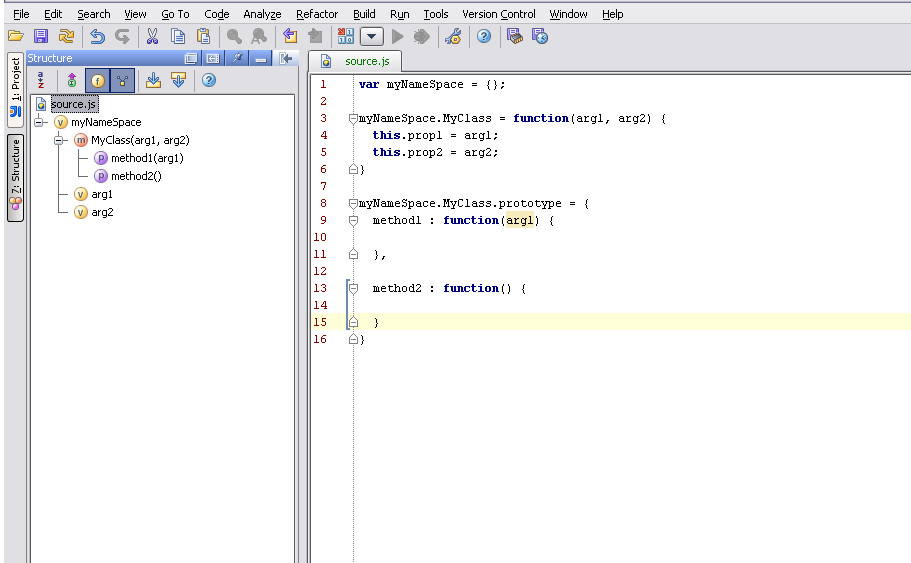
I am trying to understand how IDEA displays JavaScript structure. See the attached 2 screen shots.
In screen shot 1, I have this code:
var myNameSpace = {};
myNameSpace.MyClass = function(arg1, arg2) {
this.prop1 = arg1;
this.prop2 = arg2;
}
myNameSpace.MyClass.prototype = ,
method2 : function() {
}
}
myNameSpace.MyClass.prototype.method3 = function() {}
The structure view correctly shows that I have defined a class but treats method1 and method2 as properties (with a 'P') and method3 correctly as method (with a 'M'). Shouldn't the first 2 also be detected as methods?
In screen shot 2, I have this code:
var myNameSpace = {};
myNameSpace.MyClass = function(arg1, arg2) {
this.prop1 = arg1;
this.prop2 = arg2;
}
myNameSpace.MyClass.prototype = ,
method2 : function() {
}
}
Here the class is displayed as a method with 2 properties. Why isn't it still a class?
Also in both cases, the structure contains as variables (with a 'V') the arguments of the constructor. Shouldn't these instead just be shown as function arguments?
I am using 7.0.2 EAP (build 7531) on Windows.
I realize these may seem to be minor details, but we do a lot of JavaScript and having it display correctly and consistently is important.
Marc
Attachment(s):
IDEA Screen Shot 1.jpg
IDEA Screen Shot 2.jpg
请先登录再写评论。
Since there is no strict class definition in plain JavaScript, IDEA
shows syntax structure and adds guesses of what are 'class' / 'methods'
/ inheritance / etc dependending on class patterns used.
Btw, I believe showing class icon for the first case is a bug (latest
7.0.2 will not show it). As to properties I agree with you, please, file
JIRA request.
Marc Rabil wrote:
--
Best regards,
Maxim Mossienko
IntelliJ Labs / JetBrains Inc.
http://www.intellij.com
"Develop with pleasure!"