Squiggly line in tab but green box for file

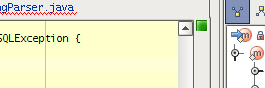
I have been seeing a discrepancy between the squiggly underline in the
tab to indicate a problem and a green light in the analysis box to
indicate no problems. I believe the squiggly line is stale, or else I
don't understand what it is trying to tell me.
I've attempted to attach a partial screenshot to illustrate what I'm
seeing, hopefully that gets through...
-Cory
Attachment(s):
IDEA.png
请先登录再写评论。
I've seen this too. As a workaround, I closed/reopened the project.
Is there any setting to turn that squiggly line off from the tab? I like it
the way it was in IntelliJ 5.1. No red curly lines in the tab.
Tom wrote:
So, is this a bug or do I misunderstand what the red squiggle means? Is
there a way to find out why IDEA has but the red squiggly underline in a
tab?
Cory
This looks like http://jetbrains.net/jira/browse/RSRP-3061 or #8678 or
#8036. Apparently it was fixed. I'm running build #6107 on Linux so I'll
wait until the next version is released to check again.
cory
Cory R wrote:
>> I've seen this too. As a workaround, I closed/reopened the project.
Actually, I think this is http://jetbrains.net/jira/browse/IDEA-10653
Cory R wrote:
>> Tom wrote:
>>> I've seen this too. As a workaround, I closed/reopened the project.
>>
>> So, is this a bug or do I misunderstand what the red squiggle means?
>> Is there a way to find out why IDEA has but the red squiggly underline
>> in a tab?
>>
>> Cory