Find Tool Window geht nicht

Hallo,
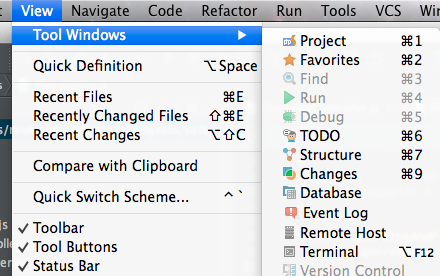
warum kann ich bei mir nicht mehr die Ergebnisse aus "Find in path" anzeigen lassen?
Danke
Al
Attachment(s):
Bildschirmfoto 2014-01-31 um 10.08.53.png
请先登录再写评论。
Hallo,
warum kann ich bei mir nicht mehr die Ergebnisse aus "Find in path" anzeigen lassen?
Danke
Al
请先登录再写评论。
Hi,
Edit | Find | Find in path.
And English please, if you don't mind.
Hi,
this is not working. I can not see any result. I can not open that view.
See you Al
Did you see my screen?
Yes, in your screenshot you are opening View, not Edit.
Yes...because i dont look for the function. I want to see the results. And yes i searches for an existing string ;)
It only makes this on left bottom and when i click on it i only see my todos
Attachment(s):
Bildschirmfoto 2014-01-31 um 10.38.20.png
I can not confirm such behavior in Mac. Can you try Find | Find in path and then cmd+3?
This is not working as you see on my first screen. The function is disabled. This is after searching something. What an elementary function is blocked by storm. Is here no other support? Cant i pay for a solution? Now i lost one hour working time...:(
Please provide step by step scenario:
1) How do you invoke Find? Shortcut, menu item?
2) What is your find options (case sensitivity, Whole words, regex) - better attach a screenshot
3) Find tool window should open NOW, while search is executed.
If not - Provide zipped log from Help|Reveal Log. May be something is broken in your installation.
The solution comes from the great support team ;)
Hi,
Please try File | invalidate caches and restart. Then try to "Find in path" again and check out tool window.