How set tool path in Command Line Tool Support?

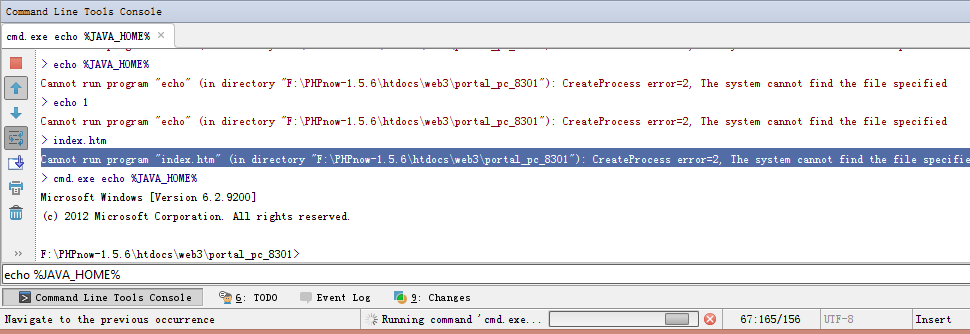
I'm using Webstorm6.0.1. Now I want to build automation for our project code, so I would use command line tool. I installed the command line plugin and added the custom tool, the alert box demands to specify Tool Path? What I should type? I try / or cmd.exe path, but when I type in command line console, e.g. 'cmd.exe build svn update', or 'echo %JAVA_HOME%' ,the process displays and no result, or prompt error, e.g. 'Cannot run program "index.htm" (in directory "F:\PHPnow-1.5.6\htdocs\web3\portal_pc_8301"): CreateProcess error=2, The system cannot find the file specified'
What I can do? I'm using Windows8. I need installed the IDE again? I forget whether I installed the IDE again after I installed Windows8 system.
Best Regards
From a Chinese Developer
Attachment(s):
Unnamed QQ Screenshot20130423145607.png
请先登录再写评论。
Hi there,
1) "echo" is internal command to cmd.exe (only available in DOS command line; can only be executed once cmd.exe is running) -- same as dir, start and many other.
2) "cmd.exe echo %JAVA_HOME%" -- wrong as well. You should check cmd.exe help (cmd.exe /?) for correct syntax. You need to use /C or /K options: "cmd.exe /C echo %JAVA_HOME%"
3) "index.html" -- same again -- it's not executable command (exe/bat/cmd/etc), it's just html file.
I have no answer -- you have not specified what you are trying to achieve / what command you are trying to setup.
But generally speaking it's the path to some tool (bat/exe/etc file) that you want to execute. So instead of typing full command / long path, you may just type short alias instead.
Hi Andriy Bazanov,
Thank your answer, I begin to know what you mean. Perhaps I should complete a bat file at first which contains the command I want the IDE does. So I begin to write the file but how I introduce it to IDE?
e.g. I set tool path 'F:\PHPnow-1.5.6\htdocs\yuicompressor-2.4.2', but when I type 'portal.bat', IDE output :
'Cannot run program "\portal.bat" (in directory "F:\PHPnow-1.5.6\htdocs\web3\portal_mobile_8299"): CreateProcess error=2, The system cannot find the file specified'
Even though I copy the bat file to the directory, and run it manually sucessfully. But when I type the command in IDE 'portal.bat', it failed with output above.
Best Regards
From a Chinese Developer
If you setting up tool path, it has to be full path to the actual file, e.g. F:\PHPnow-1.5.6\htdocs\yuicompressor-2.4.2\portal.bat (or whatever the path is)
I do see the same. Currently such file either has to be in located in one of the folders listed in PATH environment variable .. or you must provide FULL path to that file. It seems (based on IDE behaviour) that PhpStorm does not look for actual file in current folder -- not sure if it is a bug or what.
http://youtrack.jetbrains.com/issue/WI-18110
Alternatively:
Instead of using Command Line Tool, you may setup External Tool entry (Settings| External Tools) and use it instead:
Hi,
I do as you demonstrate, but it fails again. Perhaps I ignore some configuration. Thank you, I'll look through it tomorrow. It's closing time in China.
Best Regards
From a Chinese Developer
Which one you have tried (1st or 2nd) and how?
If first one: you may try another macro instead (click on "Insert Macro" button to see all possible options) .. or later the relative path to match your project structure (since I do not know your project structure).
Hi,
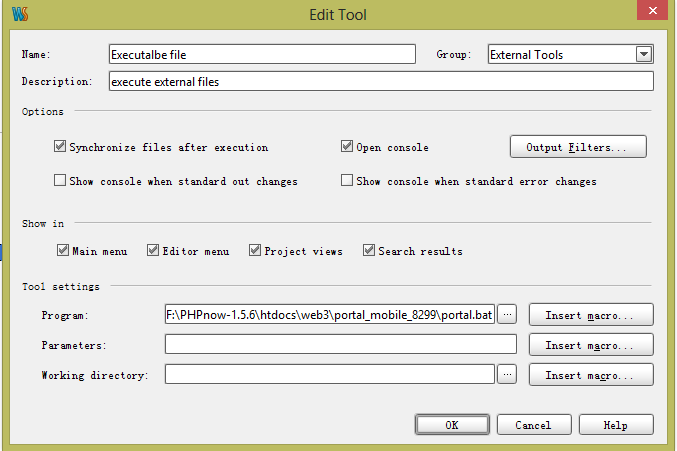
Perhaps I misunderstood you . now I set as follows:
‘$' you type in example indicates the path not a signal demanded? Now I can select Tools-External Tools-Executable file and it works.
Thank you very much, I know little about command line so some simple explanation I can't understand. Sorry.
Best Regards
From a Chinese Developer
$FilePath$ was not exact path, but a macro. Each time you invoke tool on a file, it substitutes $FilePath$ with its path. More macros you can discover using Insert macro... button.