How To: Code completion on enter key?

Hello,
Is it possible to auto complete HTML tag attributes when the enter key is pressed.
quick screencast showing my question: http://www.screenr.com/P9a (EAP 106.444 but afaik all previous have been like this)
the first line I type <a href[enter] and it gives me <a href=""
the second line I type <img src[enter] and it gives me a new line.
I would like an option to auto complete the ='" part if you have already typed the entire html attribute.
So if there is only 1 option in the auto complete list, still display the auto complete list even if the entire thing has been typed out already.
Thanks,
David
请先登录再写评论。
Do you get the auto complete drop down choices when you type the html? The auto complete is associated to the <TAB> key, not sure if you can remap the keys for the auto complete or not, check the settings menu, I have never looked to do what you are wanting so I don't know. I know you can map keys to actions but not sure about the auto complete.
I do not think you can complete such attribute via Enter as Code Completion popup is already hidden.
ATM you have 2 choices:
1) you can always finish it (have your ="" adedd) in such circumstances via Alt+Space.
2) press enter while Code Completion popup is still visible (which means, do not type whole src -- just sr and Enter)
TAB is for selecting the auto completion.. to auto complete based on what the IDE thinks it is ALT+Space which will do what you want.
i got around it by creating leve templates for the common tags. wish jetbrains would put it in the app tho :/
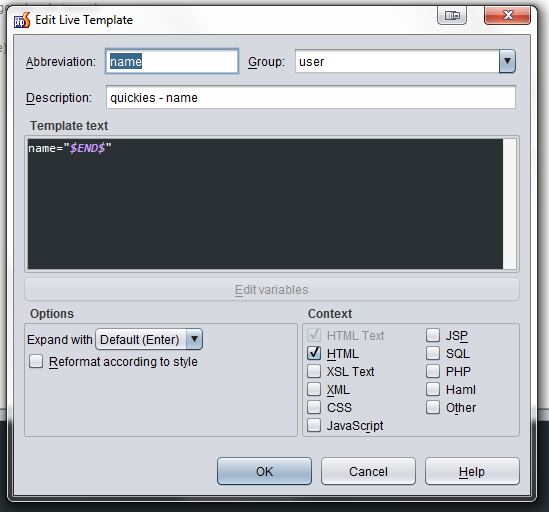
settings > live templates > user
abreviation = the attr
template text attr="$END$" <-- this will move the cursor inside the "" when you ress enter
That did the trick!
Now it will auto complete src="" if I press the enter key after already typing src
I'll just have to setup a live template for each common tag I find myself typing when coding fast.
http://www.screenr.com/985
Thanks.
edit: changing the default Ctrl+Space keymap to Enter didn't work either.
you better off not changing the ctrl + space thing :p unfortunately things seem a little "rough" with phpstorms auto complete ways.. they better than the others.. but yeah.. i kinda still prefer the way dreamweaver does stuff tbh
i have
as live templates :D
In the latest version (2018.3 at the time of this comment), set Enter as a keyboard shortcut in File > Settings > Keymap for the action: "Choose Lookup Item Replace"
go to Editor | General | Postfix Completion and then select enter from the dropdown
Disabling the AI Assistant plugin works for me.