Greatest IDE!

I used Zend Studio 5 for few years, then tried version 6 & 7 (both based on Eclipse) as well as Netbeans. I finally switched to Komodo Edit that is quite enough for my needs.
Komodo Edit is nice but veeeery slow and system resources hungry, this morning was using 99% of my cpu/ram (core 2 dual, 4gb) ending up in not letting me work at all
Having been to a WordCamp conference in the weekend I was told PHPStorm IDE is great, then decided to install and give it a try - also because I can afford 47euros if I like it
After having seen its speed I decided to spend the entire day playing with it, at the moment trying to get the same color configuration I am used to and getting used to it.
I will use it in the coming days and report any eventual bug I find here.
For the moment one minor issue, when commenting an html piece of code embedded in a php page PHPStorm uses // rather than <!-- -->
excerpt of sample code:
<?php
?>
<input type="hidden" name="macchine" value="<?=$macchine?>" />
<input type="hidden" name="boxes" value="<?=$boxes?>" />
<input type="hidden" name="spedizioni" value="<?=$spedizioni?>" />
<input type="hidden" name="ritiri" value="<?=$ritiri?>" />
/* more code here*/
?>
if I shortcut to comment any of the html lines I get, for example:
//<input type="hidden" name="boxes" value="<?=$boxes?>" />
while I was expecting:
<!-- <input type="hidden" name="boxes" value="<?=$boxes?>" /> -->
One question - in Komodo I can shift-f1 to open the php.net page describing the function/class etc where the cursor is located: is there anyway to get the same behaviour in PHPStorm? I spent some time looking for it but not able to
Thank you so much to let me try this product: long life to PHPStorm!
ugo
RC WI-95.150 on Ubuntu 10.04 64bit
请先登录再写评论。
It is known bug: http://youtrack.jetbrains.net/issue/WI-11 . I hope it will be fixed in 1.0.
Thanks!
I hope this is the right place to suggest a feature.
I would like to get a tooltip showing the file name when placing the mouse over each line in the find results, I noticed the name is shown on the navigation bar, but you must click on each name in order to update it.
Attachment(s):
feature-find-tooltip.png
Please file feature requests directly to tracker http://youtrack.jetbrains.net/issues/WI
You can UNCHECK 'Group by file structure' option:
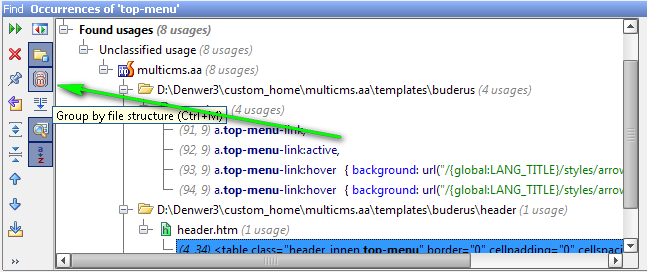
Thank you so much Dmitriy!