How to align { with the . for lambda functions in TypeScript?

What settings do I need to achieive the following formatting for typescript?
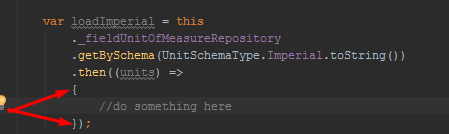
The closes I can get is to have the body of my lamda function indented.
Thanks,
~S
请先登录再写评论。
please try Settings | Editor | Code Style | TypeScript | Wrapping and Braces, Braces placement/In method declaration, "Next line".. That's the only change from 'default' code style scheme I had to make to get formatting similar to yours
Elena,
This did not help. See the video I made:
http://screencast-o-matic.com/watch/cDnVYjhM8n
Here is a screenshot of my setting:
Thanks for your help, I look forward to finding a solution with you.
Cheers,
~S
Please format your code with Code/Reformat code - what does the resultant formatting look like?
Elena,
This is how it gets formatted. This is actually pretty close to what I want. While not ideal, I could live with this. But in order to make this happen, I have to put the lambda parameters on their own line. Which may be a workaround I guess.