Help Creating New Flask Project - PyCharm 5.0.4 on OSX 10.11.2

I am trying to learn Python / Flask development using PyCharm, and following this tutorial video: https://www.youtube.com/watch?v=2geC50roans
However, my PyCharm "New Project" dialog looks nothing like the one in the video tutorial. Mine looks like this:
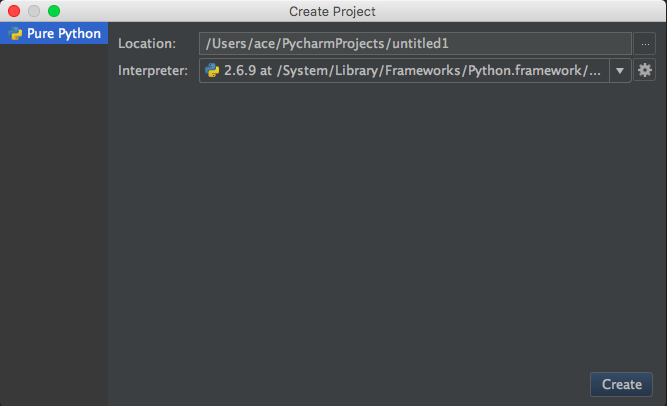
Notice there is no option for setting a project "Type", which is a requirement according to the tutorial.
How do I go about creating a new Flask project in PyCharm 5.0.4? Also, is there a source of updated tutorials (either text or video) that reflect the obviously highly updated GUI of PyCharm 5?
Thanks for any help you can offer.
Aaron
请先登录再写评论。
Nevermind - I figured out that I had to install PyCharm Professional Edition.