Code formatter has stopped working properly

I'm seeing some strange behaviour in the 3.0.1. All of a sudden the code formatter has started formatting my log macros on the same line as if statements. It only seems to be doing it for macros.
I've reset the formatter to the default (which does a really nice job) but it still formats my code like this:
if (error) {LogApp(Error, @"my log message");
}
I'm not sure what's triggered it but it's driving me a little mad. Any pointers are most welcome.
请先登录再写评论。
Macro formatting was essentially changed in 3.0, and minor change comes with 3.0.1.
Do you have the same problem with 3.0?
Macro formatting has strong dependence from macro syntax. Could you provide the macro definition?
Many thanks for the super fast reply. It led me to finding the problem:
In my pch, I define my logger macros like this:
Yes, I see. Currently the "empty" macros aren't formatted due to plenty of variants.
We can made an exception for macros with the parameters. Please, create the request if you need this.
Thanks for the reply, I will raise a request.
I'm beginning to think there's something else going on around pre-processor #if etc.
I don't think AppCode is taking any notice of the various defines I have in my targets.
For example:
Regardless of the target I'm building, only the code in the #else ever get's 'attention' from AppCode.
If I #define PREPROCESSOR_DEFINED_IN_TARGET_1 immediately before the code example above, AppCode shifts its 'attention' to the syntax error.
This issue also has the effect that optimise imports may remove imports required by code in #defined blocks that AppCode ignores.
Am I missing something here? Have I got my build setup wrong? Perhaps a bug?
Any help would be gratefully received.
Does changing resolve context on the status bar changes the way the file is highlighted?
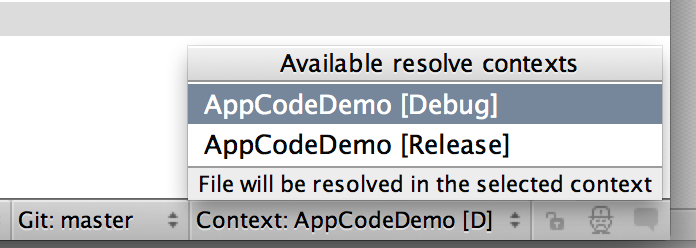
Thanks for the reply, I'm now feeling a little silly.
That works nicely.
Is there a way to link the context with the build scheme so when I switch schemes, it selects the equivalent DEBUG context?
No, there is no such at the moment, but we'll think about your suggestion
Great, thanks for getting back to me (I'm still feeling somewhat silly).