Configuring Python environment shipped with 3rd party software (MySQL Workbench 6.1)

Hello,
I have just downloaded PyCharm as my first Python IDE. I felt it was the logical choice after having switched from Eclipse to IntelliJ a few weeks ago. ;-)
Anyways, I have problems configuring the Python interpreter that is shipped with MySQL Workbench 6.1. You can get it here BTW: http://dev.mysql.com/downloads/tools/workbench/
The python.exe is located in the Workbench install dir, absolute path is C:/Program Files (x86)/MySQL/MySQL Workbench 6.1 CE/python.exe
When going to the Python Interpreters settings page and entering a new Python interpreter via the green plus button, I get the error box saying "Invalid Python SDK":

The interpreter will stay in the list however. Then below I recognized a link trying to set up a virtual environment:
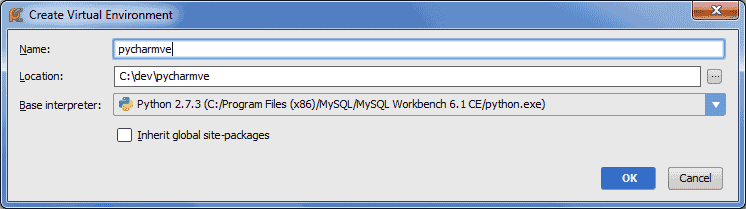
Pressing OK then results in another error box:

I really feel kind of confused what to do here. I have never worked in a "real" Python environment, so I have no idea what might be missing. Maybe some environment variables?
How do I generally find my way around to solve such things?
Any help on how to integrate the MySQL Workbench Python interpeter into PyCharm would be greatly appreciated.
Thanks
Kawu
PS: probably related: http://stackoverflow.com/questions/22623011/whats-the-structure-of-a-valid-python-sdk
I have just downloaded PyCharm as my first Python IDE. I felt it was the logical choice after having switched from Eclipse to IntelliJ a few weeks ago. ;-)
Anyways, I have problems configuring the Python interpreter that is shipped with MySQL Workbench 6.1. You can get it here BTW: http://dev.mysql.com/downloads/tools/workbench/
The python.exe is located in the Workbench install dir, absolute path is C:/Program Files (x86)/MySQL/MySQL Workbench 6.1 CE/python.exe
When going to the Python Interpreters settings page and entering a new Python interpreter via the green plus button, I get the error box saying "Invalid Python SDK":
The interpreter will stay in the list however. Then below I recognized a link trying to set up a virtual environment:
Pressing OK then results in another error box:
I really feel kind of confused what to do here. I have never worked in a "real" Python environment, so I have no idea what might be missing. Maybe some environment variables?
How do I generally find my way around to solve such things?
Any help on how to integrate the MySQL Workbench Python interpeter into PyCharm would be greatly appreciated.
Thanks
Kawu
PS: probably related: http://stackoverflow.com/questions/22623011/whats-the-structure-of-a-valid-python-sdk
2 条评论
排序方式
日期
投票数
The solution was to add the environment variable PYTHONPATH=C:\Program Files (x86)\MySQL\MySQL Workbench 6.1 CE\python\lib and add C:\Program Files (x86)\MySQL\MySQL Workbench 6.1 CE to the PATH variable.

This didn't help.
请先登录再写评论。