Shown text "shifted" two steps left - Solved

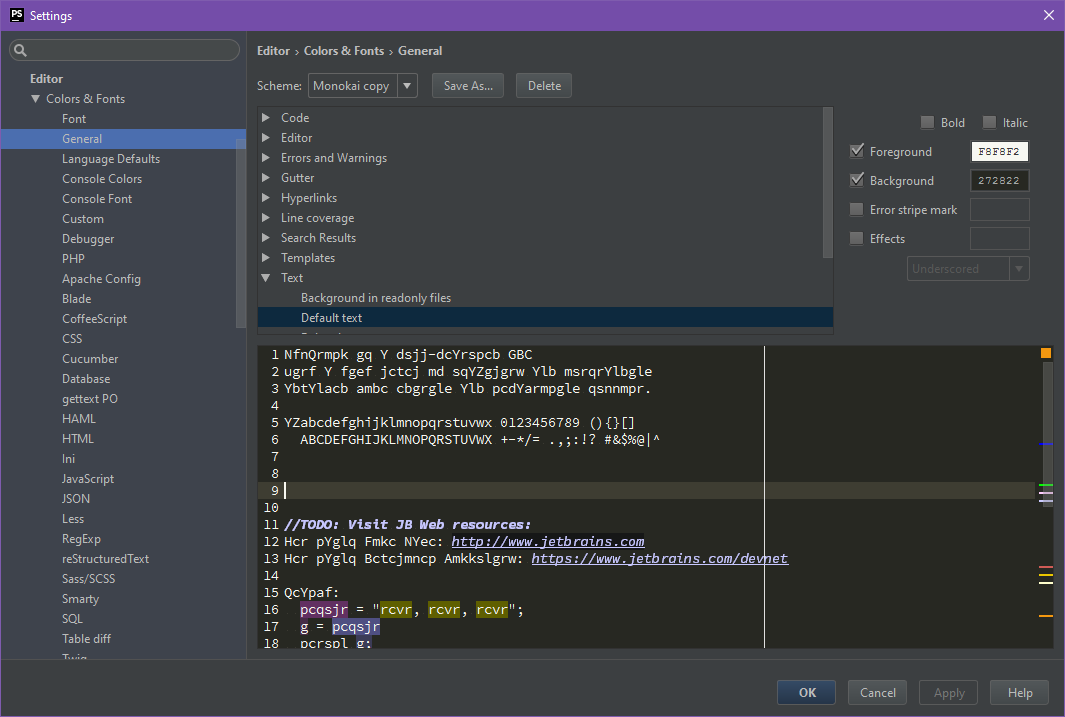
I just experienced a very strange bug. Anyone that got an idea of what the heck is going on?
See the "code field". It is a display bug, because if I copy and paste into another editor, the text is correct.
请先登录再写评论。
Hi there,
So far it looks like some font issue -- try changing it to some another (previously worked) font (e.g. Consolas) and see if it will work better there.
If you backup & delete your IDE settings (C:\Users\USERNAME\.PhpStorm2016.1 on Windows) while IDE is closed .. then launch IDE and start from scratch -- will it do any better?
So far I've seen only https://youtrack.jetbrains.com/issue/WI-31475 but it's a bit different to yours (although still looking similar in general pattern -- font letters get shifted 1 or 2 positions somehow).
Hi,
It seems that it was the font that had gotten corrupted. Tried another font, which worked fine. Reinstalled the font (Source Code Pro), and then everything worked as it should.