How do I toggle column selection mode on a Mac? See image:

Hello,
I can't figure out how to use this keyboard shortcut: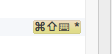
It looks like it is:
Command + Shift + Little Keyboard Icon? + Asterisk
I'm pretty new to OS X keyboard shortcuts so maybe I am lacking basic understanding.
Any help would be appreciated.
Thank you,
Corsen
请先登录再写评论。
shift-cmd-8
shift-cmd-8 seems to be a different combination than what I posted above. I can add a new keyboard shortcut to toggle column selection as shift-cmd-8 and there are no conflicts so it is a good suggestion. I am still very curious what the original shortcut is supposed to be though.
Maybe the original keyboard combination requires a numpab which has the * key? Even so what is the little keyboard icon supposed to mean.
Thank you,
Corsen
Meta (Command) + Shift + 8 (Mac OS X 10.5+ Keymap)
or
Meta (Command) + Shift + Numpad * (Mac OS X Keymap)
Cmd-Shift-8 actually works, I have confirmed that this is the shortcut by typing Shift 3 times and searching for “column select”, however different then on Linux, mouse selections are block selections, cursor selections are normal selections. Should this be classed as a bug?
John Lazar could you please share a screen recording demonstrating the difference that you see between mouse and cursor column selection?
Retested, meta-shift-8 results in block selection being activated, working in the same way for both cursor (arrow keys) and mouse now, on the latest version of pycharm
Thank you for the confirmation!