ugly fonts with linux & mercurial support

Hey,
I just stared exploring Rubymine and it looks quite promising. But there are two points I need some help with:
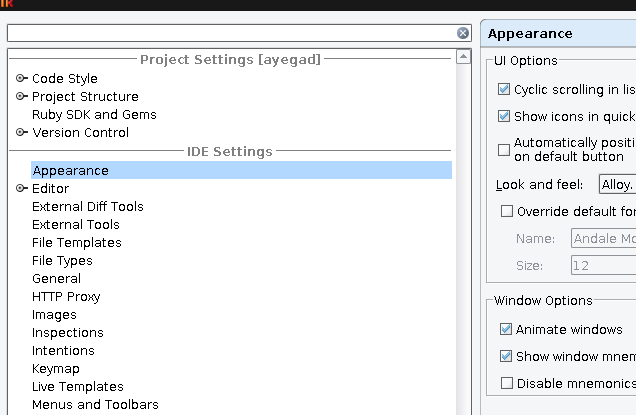
As you see in the attached screenshot the user interface font rendering looks really crappy. Is there a way to enable anti aliasing? With Netbeans I followed the tip from [1]. Even better would be if Rubymine would use the GTK murrine engine [2]. When I change the Look'n'Feel to GTK the UI changes but only to a ugly version of my GTK settings (no AA, plain text buttons).
Futhermore: Will support for Mercurial be implemented in the near future? Or is it possible to use hg4idea with Rubymine?
[1] http://forums.fedoraforum.org/showpost.php?p=1154640&postcount=2
[2] http://www.cimitan.com/murrine/
Cheers
byteforscher
Attachment(s):
crap_fonts.png
请先登录再写评论。
Hello,
There are some known issues:
http://jetbrains.net/jira/browse/RUBY-3981
http://jetbrains.net/jira/browse/RUBY-3982
Feel free to vote, comment and track progress on them.
To enable antialised fonts in editors please use File | Settings | Editor | Appearance | Use anfialiased font option.
Also you can option awt.useSystemAAFontSettings=on to ${RubyMine Installation}/bin/idea.properties file.
We'll add support in 1.5 most likely.
Regards,
Oleg
Any update on Mercurial support now that version 2.0 is out?
Thanks,
Ryan
Hi Ryan,
You can easily use latest plugin available at http://plugins.intellij.net/plugin/?idea&id=3370 with RubyMine 2.0.1
Probably we'll make it possible to install it via RubyMine plugin manager.
Regards,
Oleg
Thanks for the info. I installed it but it crashes every time RubyMine (2.0.1) starts.
see attached stacktrace. should I open a ticket?
-ry
Attachment(s):
rubymine-hg4idea-stacktrace.txt.zip
I think the best way will be to create an issue in http://bitbucket.org/viacoban/hg4idea/issues/
Best regards