Create customized function on Alt+Enter

Hi there,
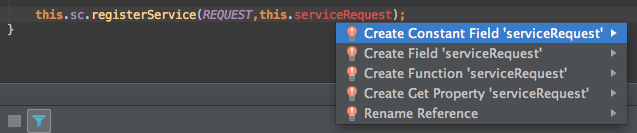
How can I create (If its possible) custom method creation template, for Alt+Enter
for example, I want to create method with params, like this:
private function serviceRequest(params:Array):void
{
}
instead this:
private function serviceRequest():void
{
}
thx
Attachment(s):
Screen Shot 2013-10-24 at 11.13.27 AM.png
请先登录再写评论。
For it to appear on the intentions/quick-fix menu (i.e. Alt+Enter) you would need to write a custom plug-in since things can only be added to that menu via the API. What you can do is write a Live Template. (File Settings > [IDE Settings] > Live Templates ). You can access Live templates from the live template menu (Ctrl+J by default) or directly by typing its abbreviation followed by [Tab] or [Space] depending on the template's settings. There are a number of built-in templates and they can serve as good examples to emulate. When writing a live template, you have access to macro functions for things like inserting the class name, opening up code completion, providing a selection of in scope variables, and more. See the Help guide for more information.