11.1 and PHP plugin?

Hi,
Sorry if this has been covered, I am new to IntelliJ IDEA and 11.1 is my first upgrade.
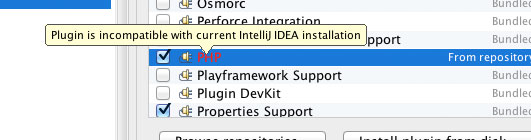
I am trying to work in a PHP project and the PHP plugin has stopped working (See graphic)
I am guessing it has to be updated or is there something that I am missing?
Thanks
Attachment(s):
idea_php.jpg
请先登录再写评论。
To update the plugin, press the "Update Plugin" button in the toolbar.
Thank you Dmitry!
It works great now.
(for any other newbees out there --> ) I had updated the plugin but did not restart the IDE - so the plugin still showed as incompatible and the 'update plugin' button on the toolbar was greyed out.
Restarting the IDE fixed it all for me.
Thanks again for the very quick response Dmitry
Justice,
Have you had a chance to compare PhpStorm with IntelliJ IDEA with PHP Plugin? If you so, would you mind sharing your experience on my question: IntelliJ IDEA and PhpStorm Performance Comparison?
Thanks,
David Carroll
Hi all,
I don't see PHP plugin in IDEA 12, settings-plugins - while official docs https://www.jetbrains.com/idea/webhelp/enabling-php-support.html says it is there.
I also don't see PHP at http://plugins.jetbrains.com/?idea - http://plugins.jetbrains.com/plugin/?idea&pluginId=1861 says 'please use the bundled PHP plugin which goes with IDEA 9'.
May you please clarify?
Thanks!
The plugin is there: http://plugins.jetbrains.com/plugin/?idea&pluginId=6610
Note that it requires IntelliJ IDEA Ultimate and is not available in IntelliJ IDEA Community Edition.
Dmitry, I've installed 129.91 under ultimate 12.0.4 - and it says "Plugin is incompatible with current IntelliJ IDEA installation". What am I doing wrong? And why do people in comments say they have same incompatibility problems? Thanks.
Plugin version 129.91 requires IntelliJ IDEA 12.1 RC. If you're running 12.0.4, you need to install the version 127.100.