HotSwap/Automatic compile of java when debugging is not working.

I have to select "Compile XYX.java" or select "Reload changed classes" from the menu before hotswap works no matter what i try in hotswap project settings. Am I doing something wrong or it it really not "automatic" (eclipse is truely automatic).
请先登录再写评论。
IntelliJ IDEA does not compile your project automatically.
Is it possible to customize the main toolbar with the "Reload Changed Classes" button so I can easily do hot swaps while debugging? Or at least add a mnemonic shortcut to the menu item in debug menu?
I tried to add it to the main toolbar but it looks like I can only move the menu item up and down inside teh debug actions menu... can't copy the menu item and paste it in another menu or toolbar?
Just press Ctrl-9 (Make).
In Eclipse you have to press Ctrl-S, so what's the big difference?
On 09.03.2012 20:10, Paul C wrote:
>
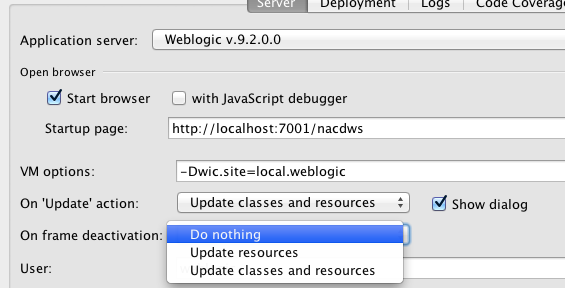
For Web Applications at least you can set an option in your Run/Debug Configuration to update classes and resources when you switch to your web browser (to test). This only works for web apps though. However, if that is what you are working with then you may want to turn on this option.
Thanks Michael and Dmitry. It is a web app. Thanks for the tips.