Maven based web-app in IDEA -- Lotsa room for improvement?

Folks,
Disclaimer: This is a rather long post. But I have painstakingly provided all the details.
It's a bit disappointing that I am still seeing lots of room for improvement with Maven+IDEA. It's as if stars have aligned to foil my attempts to sell IDEA ...
Here are the details:
0- IDEA 9.0.1 (previous to latest) on Ubuntu 9.1.0. Java 1.6. Maven 2.2.1.
1- Since Maven is to be used, I created a simple archetype with the option 18 (mvn archetype:generate, choose 18). The pom.xml is created. I add the usual Java-1.5 cruft to build/compiler plugin. A simple POM gets generated. It builds the web-app war with mvn clean install. So far so good. See the pom.xml attached.
2- Open this pom.xml in IDEA. Opens well.
3- Now, I want to create a Servlet. The first problem I see here is that when the Project Window has the (default) View as:Project and then right-click for New ... and to my disbelief, there is no "Servlet" menu-item in it. What? I can't create a servlet for a Java web application?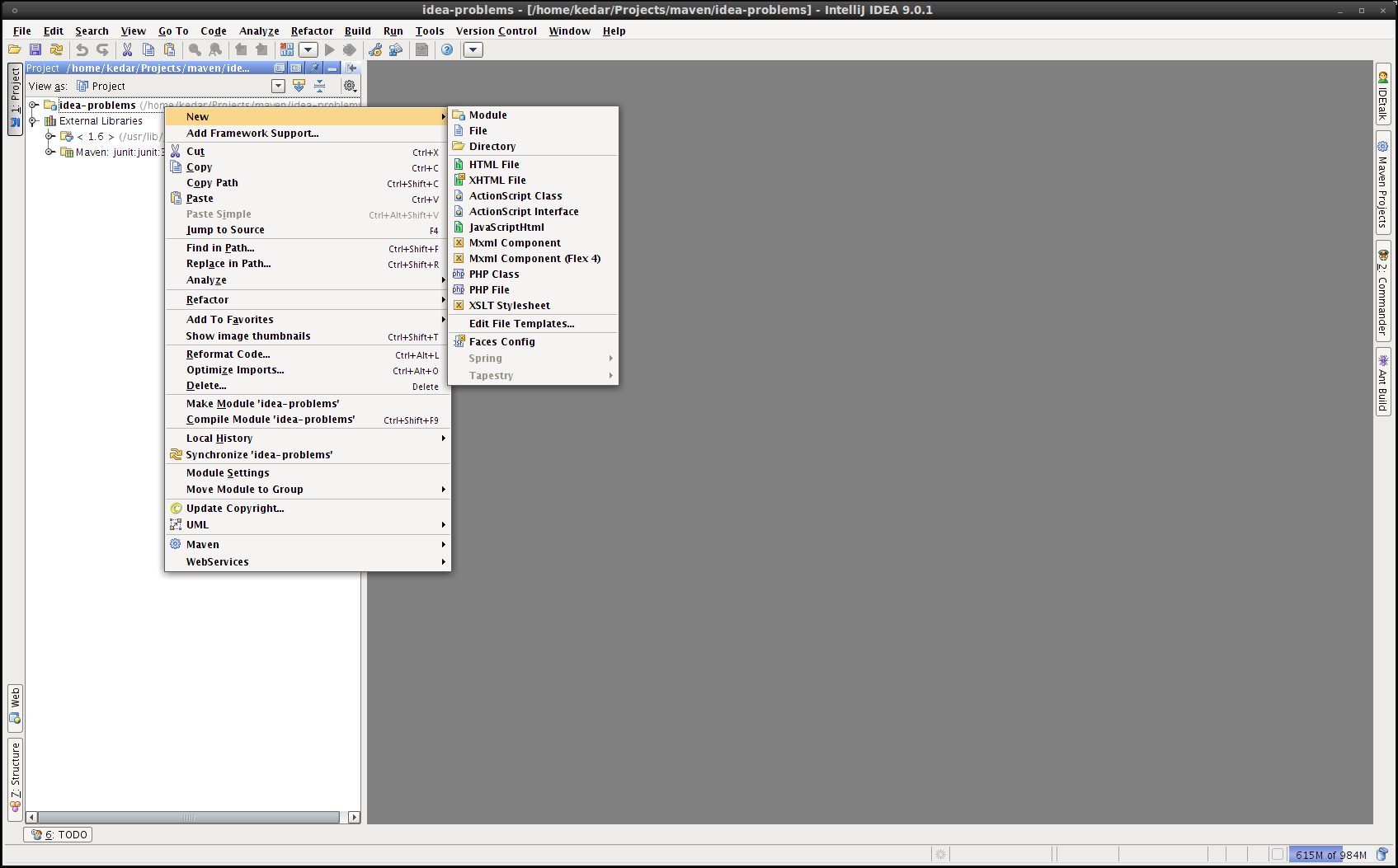
4- I figuer out that I have to choose Packages in "View as:". Then, magically, "Servlet", "Filter", "Listener" start appearing! This is a bug (and a good one to fix), I suppose.
5- I choose New -> Servlet, provide the name etc. as TestServlet, provide some basic web.xml configuration for it and then it generates the boiler-plate servlet code.
6- The problem is that I get the generated code as:public class TestServlet extends javax.servlet.http.HttpServlet {
protected void doPost(javax.servlet.http.HttpServletRequest request, javax.servlet.http.HttpServletResponse response) throws javax.servlet.ServletException, java.io.IOException {
}
protected void doGet(javax.servlet.http.HttpServletRequest request, javax.servlet.http.HttpServletResponse response) throws javax.servlet.ServletException, java.io.IOException {
}
}
with all of javax.servlet classes/interfaces having the ugly red wavy underlines.
I choose the class and do Alt+Enter to add the Maven dependency (I choose servlet-api from the popup window). It says I need to (re)import the Maven project, which I do, and then see that my pom.xml has been modified as:
<dependency>
<groupId>javax.servlet</groupId>
<artifactId>servlet-api</artifactId>
<version>2.5</version>
</dependency>
Note that the scope is not "provided" which is probably more sensible default given that all standard servlet containers package the servlet-api classes/interfaces. This is a good RFE to fix, I suppose.
7- I do Maven->force reimport. The TestServlet that is created in src/main/resources still shows those ugly red underlines and my code completion goes for a toss. I can't do Ctrl+Space, Alt+Ctrl+Space on an instance of HttpServletRequest, HttpServletResponse in the boiler-plate servlet code that IDE generated. I can't use IDE is code completion does not work. Period.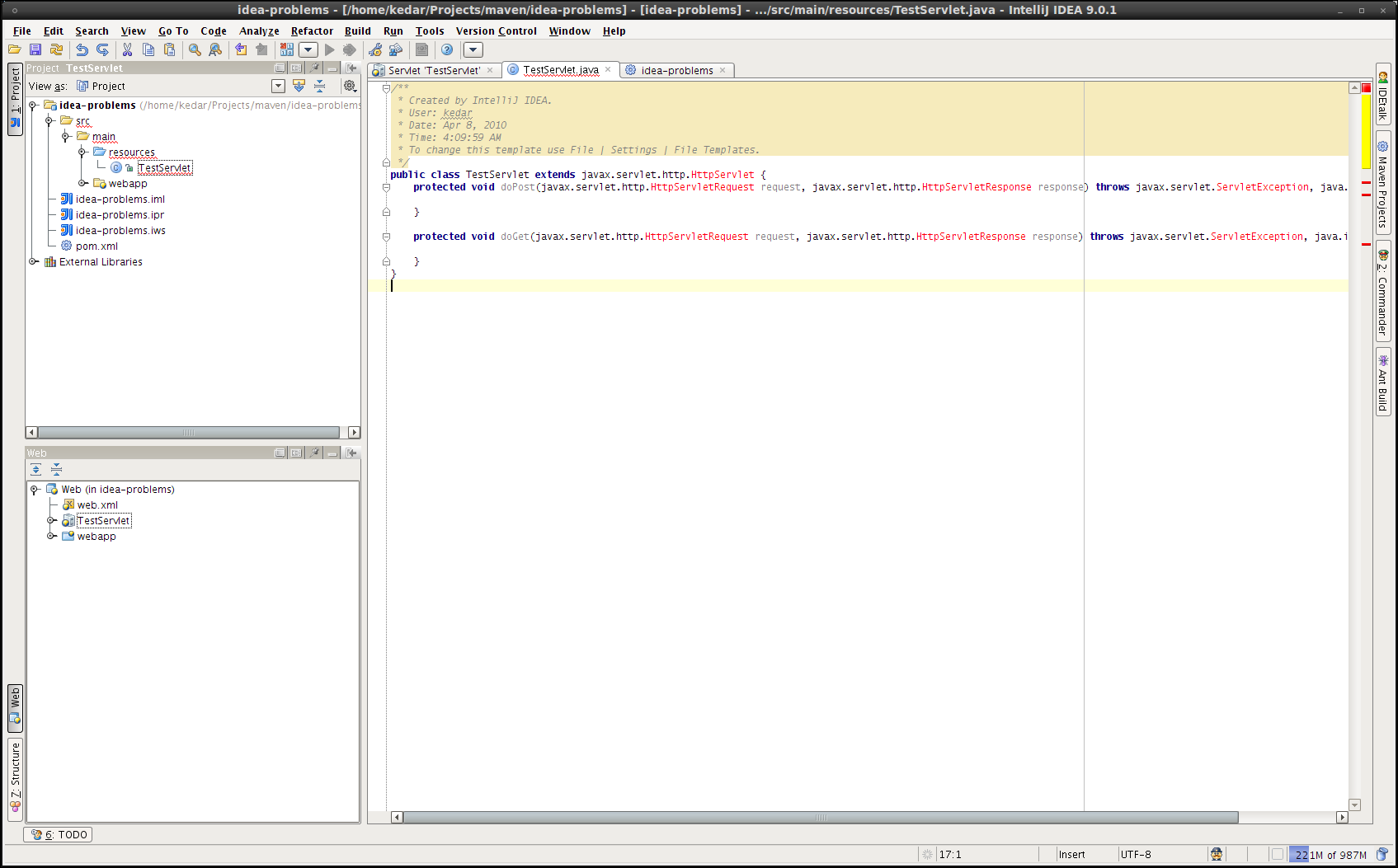
8- This turns out to be finding out IDEA problems in Maven environment. The former was my choice (IDEA), the latter was enforced (Maven). I have to make this work in Maven environment, no choice. I give up.
Please help reinstate my belief that it's me who is going wrong. Please suggest steps that I could alternatively take.
Thank you,
Kedar
Attachment(s):
pom.xml
请先登录再写评论。
Please make sure the servlet library is correctly resolved (check Maven Projects tool window).
As for your suggestions, we'll try to do some improvements.
Thanks,
Anton Makeev
I am still unsure why it does not work on my machine. On another machine a similar exercise works (no resolution problems). But in this machine, the IDE shows all libraries resolved in the Maven view.
I will investigate more.
Thanks for your response.
-Kedar