intellisense and documentation for jquery

Hi
I don't succeed to use easely intellisense ( completion variable object type and documentation pop up ) for jquery .
I try t ounderstand how intellisense and documentation could be use with phpstorm .
I know dreamweaver and VStudio add some custom code that could be interpret only by their ow IDE.
for example VS add ///reference path="path/to/jquery.js" /> to handle manage intllisense and docuementation .
--phpstorm conept is scope : Global -> Project -> file ( hector)
--shift F1 ( i l lthink Ctrl space !!) for HTML ,CSS , Javascript PHP ( core and thrid library )
It seem explain in some webpage after search in google but does the completion work inside html and php file or only inside *js extension file ?
The second problem also can be which documentation format is supported by phpstorm. It is not because i enter a link to jquery documentation website or download source ( without comment) that phpstorm can show use word auto completion and documentation !!
Here some list among many one : JSdoc, YUI Doc , Doxx , doctool, docstrap, DocumentJS , JSext Jgrousedoc
I think it really basic question
I ll re test any more ....
Thank's for any help because i think from user feedback phpstorm is great ......( whe n all is configure well)
https://www.jetbrains.com/webstorm/help/configuring-javascript-libraries.html
http://blog.jetbrains.com/webide/2010/11/working-with-javascript-libraries-in-phpstorm-webstorm/
http://blog.jetbrains.com/webide/2012/08/tips-on-jquery-development-in-webstorm/
https://www.jetbrains.com/webstorm/features/
请先登录再写评论。
Sorry, I understood nothing from your post. Did you set up JQuery as a javascript library? Did you provide the documentation URL for it? And yes - once configured, the library is available in javascript code embedded in HTML/PHP, not only in .js files.
Let me see if I can help out here.
I just downloaded the WebStorm product to evaluate and have been having an incredible time trying to understand how to do something as simple ad include a Global Library in my project.
The documentation is pretty confusing in the first place as it is written for Windows and I am using a Mac which doesn't have settings but preferences. More over the preferences are confusing.
The simple question for me is this:
When I have a javascript library (e.g. jquery) set up as a global library how do I add it to my project?
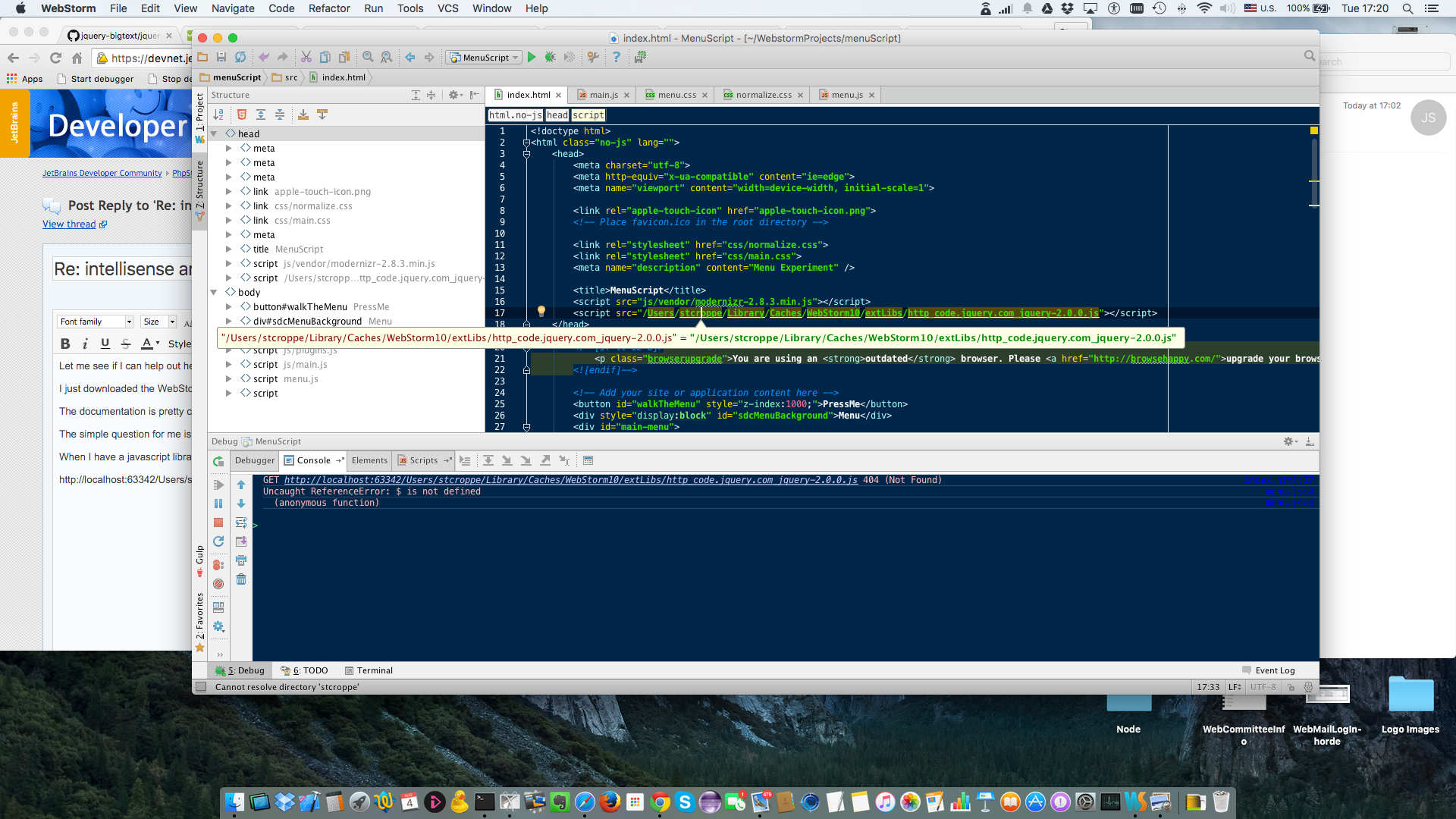
I have used <script src="/Users/stcroppe/Library/Caches/WebStorm10/extLibs/http_code.jquery.com_jquery-2.0.0.js"></script>
Which delivers a bad reference from my localhost.
GET http://localhost:63342/Users/stcroppe/Library/Caches/WebStorm10/extLibs/http_code.jquery.com_jquery-2.0.0.js 404 (Not Found)
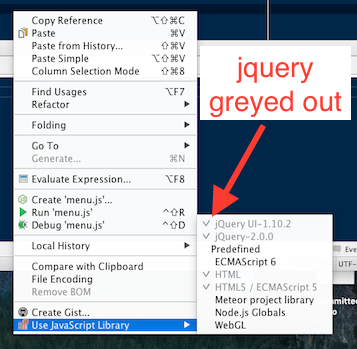
the correct reference when the library is globally available. I have tried to use the Java library selection dialogue:
But as you can see the Global library is present and greyed out so I cannot add it to my project (unless the tick mark implies my project includes it somehow automajically)?
I am resorting to direct import after copying into my project space but this does not seem to be the most effective way to do this.
Can you point me (us) at documentation that describes how to do this efficiently (perhaps with help for MacOS also)?
tag. The former are used by IDE for code completion/navigation/error highlighting, the latter are used by browser in runtime. Browser knows nothing about javascript libraries configured in IDE, IDE doesn't useJavascript libraries configured in Preferences/Languages&Frameworks/JavaScript/Libraries (and shown as external libraries in the Project window) have absolutely nothing to do with references in
references in your HTML files.
To make the library available to WebStorm for code completion, you need to either place a library .js file in your project folder or add it as external library in Preferences/Languages&Frameworks/JavaScript/Libraries.
To make the library available to browser in runtime, you MUST use
<script> tag with a valid URL browser can use to acces library script.Let me try to clear the things up. What WebStorm javascript libraries are supposed to be used for: by default, completion works for all JavaScript files located under your project root. So, if you do already have the library .js files in your project structure, it's enough to get the completion. If they are missing, and you don't like to clatter your project with all these files, you can store them externally (outside of your project) and configure them as libraries to make them available to WebStorm. Note also that libraries are 'light-weight' as compared to .js files in your project - they are treated read-only, have the inspections turned off. Plus, you can assign documentation URLs to them, enabling external documentation for library code. So, even if you have your library files in your project, it might make sense to add them as libraries
So, to summarize:
•library files placed next to your sources files in the project structure are available to both WebStorm and browser, whether or not they are added to javascript libraries in Settings
•online library referenced via CDN link in your HTML is available to the browser at runtime, but can't be used for completion in the IDE
•library files placed outside of the project and configured as javascript libraries will be available to WebStorm for completion, but won't be loaded by a browser
No surprise:) Leading slash in URL tells the browser to resolve the link relative to web server root (http://localhost:63342 in your case). And obviously no files can be found by this URL:). You need to either specify a CDN link as URL (like <script src="http://code.jquery.com/jquery-2.0.0.min.js"></script>) or copy the file downloaded by WebStorm from Users/stcroppe/Library/Caches/WebStorm10/extLibs to your project directory and specify a path relative to your .html file, like <script src="http_code.jquery.com_jquery-2.0.0.js"></script>.
Your screenshot shows that the library is already added and enabled for your project.
Please try this article: http://blog.jetbrains.com/webstorm/2014/07/how-webstorm-works-completion-for-javascript-libraries/
Many thanks for the rapid response!
OK so my hope that I can simply do something like <SHIFT><COMMAND>O while in edit mode and get a list of currently active External libraries that I can then select for including via code completion has been dashed. :(
Is that something that can be considered for a future release.
It seems reasonable to me that if WebStorm knows about external libraries (e.g. you have Downloaded to cache for global use) and can show you that they are available for inclusion in your project, that you can tell WebStorm to include the appropriate <script src="blah blah blah"></script> line in your code.
More over a related feature would be to then have WebStorm tell the developer when a new version of a given library is available in the Cache or on CDN (or both) and give an option to upgrade to the new version???
In the meantime I will continue to do the hard work (;):^O) of writing the CDN inclusion code myself and using ALT-ENTER to fix the resulting link by attaching/downloading a global library!
Regards