sourceforge.net CVS and SSH

Hello, fellow memebers!
I'm still getting errors with CVS over SSH. Here is what I have:
1. Generated private/public keys with puttygen. Placed public on sf.net yesterday(more than 6 hours ago)
2. I can connect to shell.sourceforge.net with my key-pair, but unable to connect to cvs.sourceforge.net. These sessions use the same key-pair.
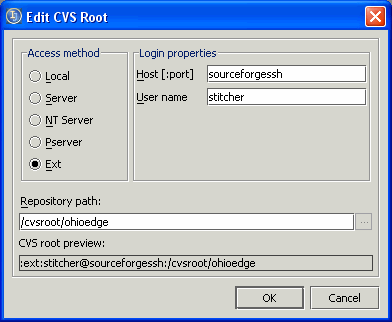
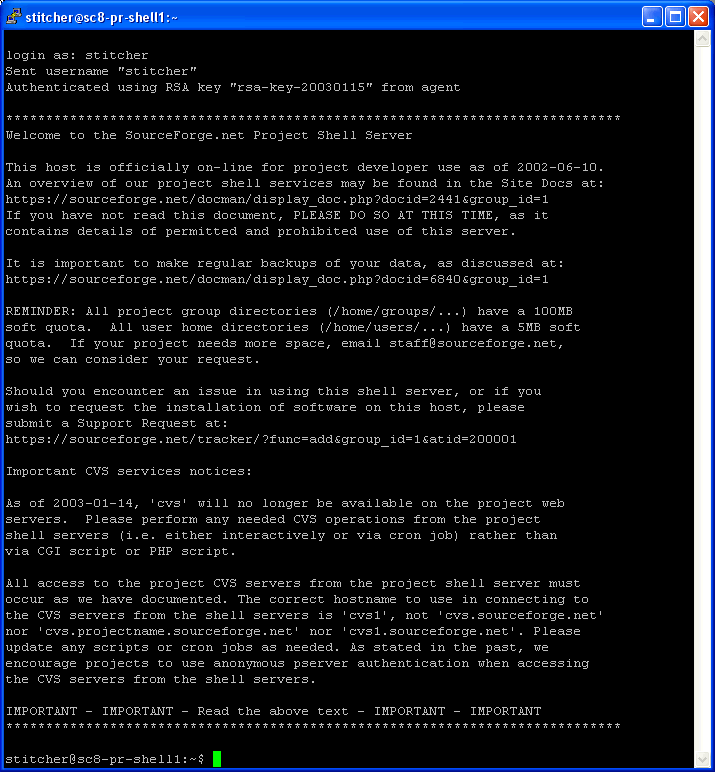
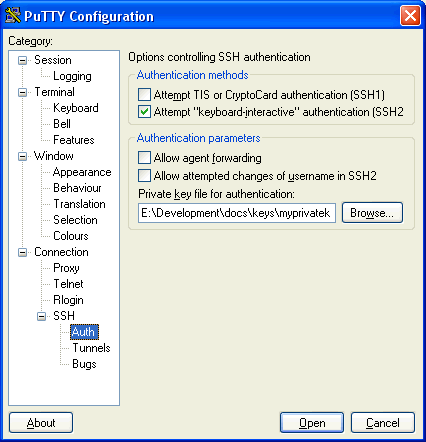
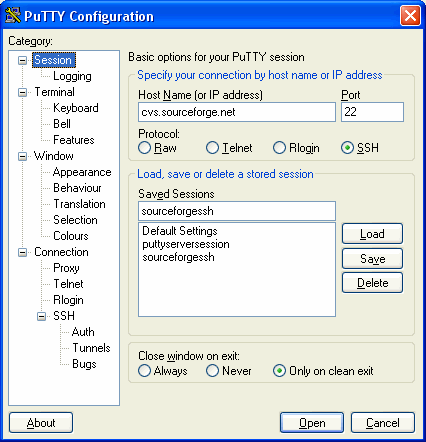
Looks like is something wrong with my pageant session settings. I attached screenshots with my settings. May be someone could help me.
Thank you in advance,
Andrey.
PS: Seamless CVS over SSH is my feature request. :)
Attachment(s):
error.gif

cvs_root.gif
sf_shell.gif
pageant_auth.gif
pageant_session.gif
请先登录再写评论。
I'm getting the same error in both cases:
1. pageant is running
2. pageant is not running
What? Nobody can help me?
I know that I need to edit something small to make this stuff work, and it's very close, but what is it?
Andrey.
You're probably missing the "log into cvs.sourceforge.net first". Before you can use CVS over SSH, you must log into cvs.sourceforge.net with a standard SSH client. Then your home directory will be created and your user account will be setup.
And oh, sf.net support crew asks for 24 hours for key propagation.
I is setting somewhere or I need to connect only once or every time I use cvs?
I successfully connected to shell.sourceforge.net. See shell_sf.gif in the first posting.
What else could it be?
Does anyone use Idea 3.0 on Windows XP with sourceforge.net? Share your experience/settings! Please. :)
Andrey.
It's getting interesting. I'm able to connect to cvs.sourceforge.net from DOS. See attachment. But Idea...
It shows password promt dialog and dumps the following info:
-
CVS Console----
C:\Program Files\GNU\WinCvs 1.3\cvs.exe status default.properties
cvs status: Empty password used - try 'cvs login' with a real password
cvs : Error reading from server cvs.sourceforge.net: -1
CVS command finished execution
-
CVS Console----
But password dialog is for pserver(!!!). I especially asked for green! No, it is from somewhere else. I asked for ext.
Help me. :) Instead of promoting Idea I'm spending my time on fighting with Win/SSH/Idea team. :)
Attachment(s):
cvs_dos.gif
login.gif
Hello!
You won't belive it. I tried WinCVS as a client, cvs-1.11.4 as a client...
But Idea works fine with cvs.exe from JBuilder 5.0 distribution only. (That's the real competition. To help each other. :)) If I change the path to CVS client to any other, I'm getting errors.
Hmm... I think I will create a new bug issue. No, really. :)
Man, how happy I am that I didn't uninstall JBuilder two weeks ago. I read somewhere that storage space is so cheap, that it's more expensive and time-consuming to delete files than to keep them. :) Think about it.
Thank you all!
Andrey.
On Fri, 17 Jan 2003 15:29:07 +0000, Andrey Myatlyuk wrote:
Easiest way I've found is to use ssh-keygen and generate a key -WITHOUT- a
password. ( or appropriate key generator), then from your sourceforge
account, paste your generated key into the provided edit box, you have to
wait a few hours for it to propagate to all sourceforge servers, but
eventually you'll be able to log in to cvs vis ssh without prompting for a
password.
If using putty, you'll need to run pagent before it works thou.
Mark
This solution is unacceptable as it destroys one of the main
protections. We aren't allowed to have non-password protected
ssh keys on our system. I need to be able to use IDEA with
ssh (on sourceforge) with a password prompt. What needs to
be done to support this? It worked on earlier versions of IDEA.
I'm on WinXP.
Thanks,
Dave Forslund
Mark Derricutt wrote:
>>But password dialog is for pserver(!!!). I especially asked for green! No,
>>it is from somewhere else. I asked for ext.
>>
>>Help me. :) Instead of promoting Idea I'm spending my time on fighting
>>with Win/SSH/Idea team. :)
I've used the CVS executable that comes with TorteiseCVS[1] without any problems, with or without pageant, with or without keys, with keys with or without password.
http://www.tortoisecvs.org
How did you configure it? I've tried using TortoiseCVS. It works very
well by itself, but I can't get it to work inside of IDEA. Did you
get it to work inside of IDEA?
Thanks,
Dave
Marcus Brito wrote:
OK! I've been using this outside of IDEA, but after configuring it
correctly by setting CVS_RSH to the TortoisePlink executable, it now
all works with IDEA! Just point the the TortoiseCVS cvs executable as
your CVS and set the CVS_RSH to the Plink and the nice Tortoise window
for entering the password pops up. Finally, I've found the right
configuration on windows.
Thanks,
Dave Forslund
Marcus Brito wrote: