Should documentation be more explicit

I go to the documentation to test javascript in place server on internal network ( not localhost ).
i try to understand the documentation and i ll expect explicit informations .
https://www.jetbrains.com/phpstorm/help/configuring-javascript-debugger.html
Here example of sentences
1) "open the project settings dialog box click Debugger and select javascript ".
In the capture screen ( on in phpstorm main gui ) using phpstrom there is no project setting dialog box
there is Menu -> file -> Settings
2) "click debugger "
for "click in the debugger"
in the capturescreen debugger don't exist in the first level of items . there is Appeareance , Editor , plugins , builds , languages , nothing else .
If i search debugger there is many items editor ->color font and also build-> debugger
3) " and select javascript"
there is no javascript item under debugger item !!
there is same problem for "on the debugger data views page that open specify the following : ...built in server port spin box
i dont find built in server port spin box in Debugger ->Data Views !!
All this little problem make me waste my time even i do my best take time to read the documentation.
All problem seem about GUI name element that change beetween version .
the documentation is about 8.02 and i use phpstorm 8.02 version
regard's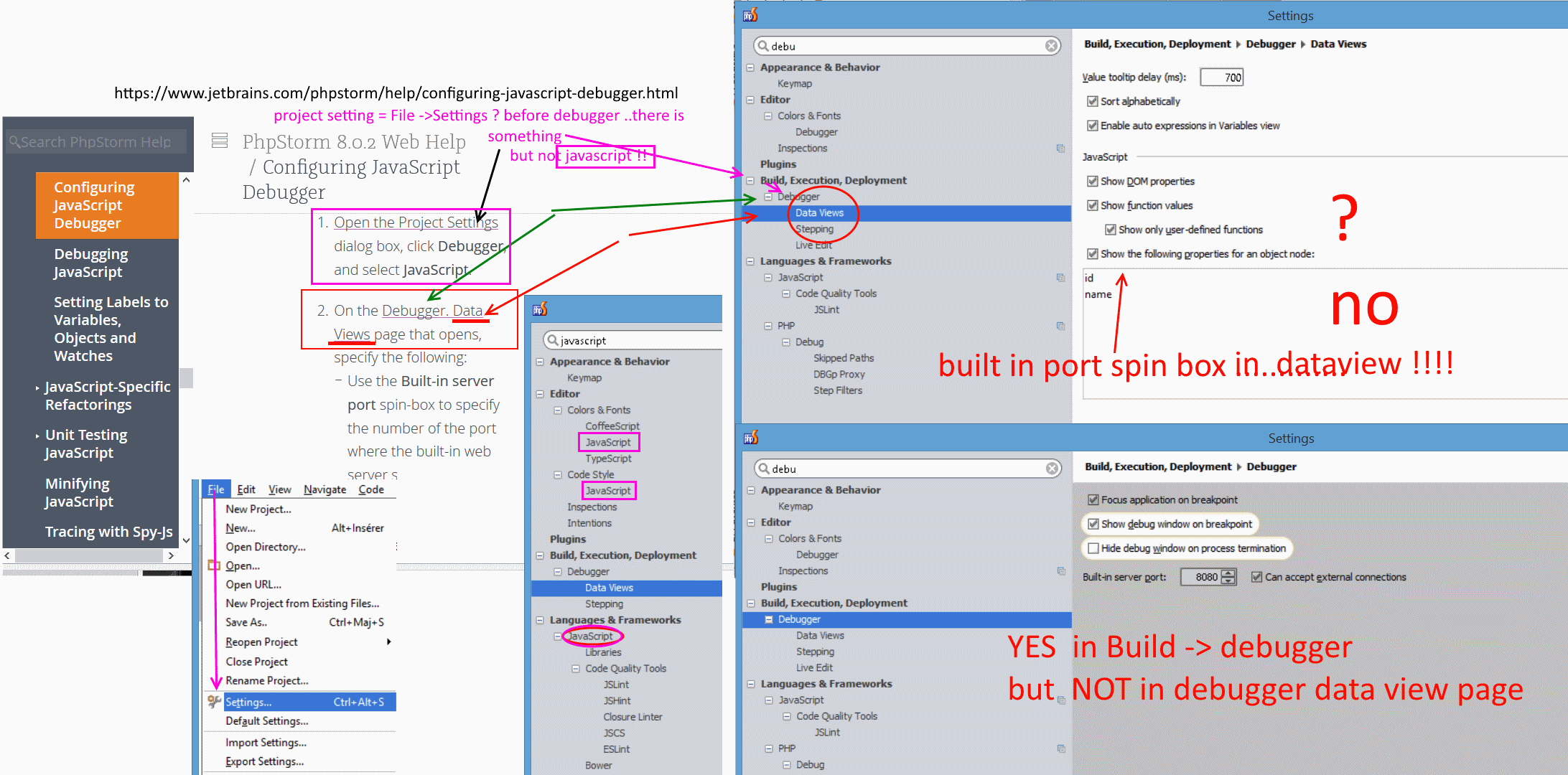
请先登录再写评论。
Hi
It seem i not the only one to find cubersome
A) phpstom setting
B) documentation
A) phpstorm setting
1) many post exist about how it is cubersome to configure phpstorm ?
2) some wrongs labels name that distub the user when configure phpstorm .
The problem seem because there was no concept of project so many panel before configuring/setting values ( seem new version change this )
B) online documentation
With phpstorm we really need to read the documentation by using many webpages (disturbing) .
I know also a small company that have great online documentation call "user manual" base on Adobe RoboHelp
robo help use tab with content ( chapter sub chapter page) and alphabetic index like a book but no advanced form search like phpstrom .
I and I think past and also new users really need step by step tutorial and simple tutorial .
why not an explicit ( with some comments "tricky" ) tutorials that mix some item of 1 2 3
1) html css , javascipt , php
2) page : static html page , php page and php in CMS page ?
3) a projet directory locate : inside local server , local outside the server directory , in remote server
this little company has also some chapter like troubleshooting -and examples
each items is cover by unique page really long one page with capture screen of the last version and step by step
phpstorm cover in many case only new high end technology like vagrant , nodejs .......
I don't think phpstorm is not the right tool for me , but this could already enhance ......
In file -> settings panel ; I really like the search form that show only the hierachy of sub items
feedback user is important even here it is not about enhance php code functionnalities !
regard's
Another "issues"
1) when you debug on specific port , and change the default port in phpstorm. When launch phpstrom first and then the server ; the server could not be launch because implicitly phpstorm launch a server on this port . So launch the server before the phpstorm client .
2) debug session can be configure by create instance but is not explicit say if we debug html/css , javascript or php . .
Documentation speak to create 2 profiles in the same browser one for debug and another for browse. But don't cover creation of new tab inside the same browser for browser after an already tab is open for debug .it seem launch javascript debug mode include debug html/css debug and php debug mode support only php debug
3)We don't really know which browser ( seem only firefox and chrome) can support different debug mode ( css/html , javascript , php ) not the mode find during Menu -> run-> edit configuration-> +add new configuration (App engine , chromiium , behat , karma , mmocha , node-webkit , nodejs, node remote, nodeuint ) .
It take some time to understand phpstrom , it is not a microsoft Friendly because it do many things implicitly but it work's great if you know this .
The purpose of the post is only for report information in the forum and give my feedback to new users .
Attachment(s):
phpstorm_prefconfiguration.png