Sources Root missing from Project View after upgrading from 2021.3.3

Dear Support,
I am using IntelliJ 2021.3.3. After upgrading to last version of IntelliJ, and after that either to the older 2023.3.8, I noted that Project View missed the project files.
Here we have it in IJ-2021:

And here it's missing in IJ-2023:

Above, you might see images taken from two similar projects, each one opened with one IntelliJ version.
To me, the configurations seem to be correctly set up, in fact, apart from duplicating the project in other directory, I didn't change anything, as the settings are relative to the project root.
Here we have the essentials from Project Settings, images taken from IntelliJ 2023, but they are identical to the settings in IntelliJ 2021, apart from name and directory:
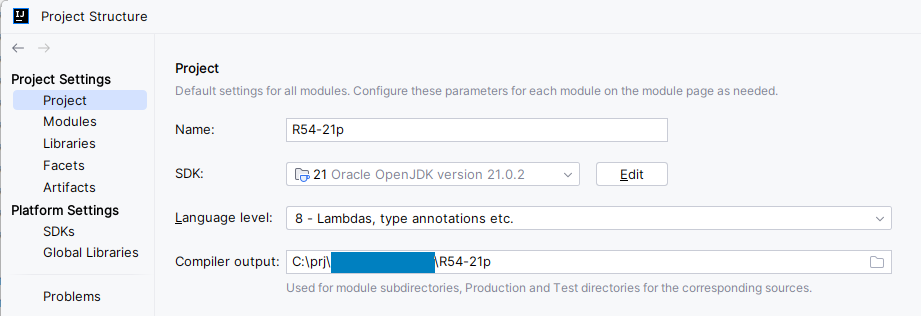
Content directory is OK, as Sources is, also, correctly marked:

Changing to “User module compile output path” and setting appropriately the two paths below (not in screenshot) to the project directory, makes not difference.

Invalidating caches, removing configuration files (.idea dir, .iml file) etc didn't work either.
I attempted to use IntelliJ 2022.3.3, and this time the root directory reappears, but I stumbled again upon the error that made me decide to upgrade from IntelliJ 2021 in the first place, that is “Cannot resolve symbol ‘RoundingMode’” IDE error, which occurred when changing JDK from 1.8 to Open Java JDK 21 (even though I cannot think of a reason for this error, RoundingMode being in Java since 1.5):

I would like to know if there is any way to bring back the sources in the project.
Thank you,
Bogdan
请先登录再写评论。
Hi,
I have created a bug report for your issue:
IJPL-180810 Project tool window fails to show excluded project root even if the "Exclude files" option is enabled.
As a workaround, please exclude all subdirectories except the project root R54-21p.
Does it help?
Hi,
To keep moving, I managed to remove any reference to
java.math.RoundingMode. Doing so, the 2021's version IDE works fine now.I tried to apply your suggestion, but attempting to remove the “Excluded” tag from the root doesn't toggle, as it does with "Sources", for example. In the image below, you can see the actual state: only “Sources” tag could be toggled on root directory. All other subdirectories are already excluded, and making them “Sources” is pointless, as some are the package root of contained projects.
`Alt-E' shortcut is not working, either.
---
As a side note, I don't know if this is meaningful granted I'm not using the last version of IDE: I also opened a Maven project for the first time with the IntelliJ 2023.3.8 version. The (Java) sources were out of source root (this came to me as a surprise, being a Maven project though). I had to assign the tags to each directory by hand, but in this case it worked fine.
I gave all of that detail so that it might help you find the problem. For what concerns me, after I applied the tweak in the first line of the this post, I'm good for now.
Thank you for support.
>I tried to apply your suggestion, but attempting to remove the “Excluded” tag from the root doesn't toggle, as it does with "Sources", for example.
You can click the “Exclude” button on the top to remove the “Excluded" staqtus. Does it help?
To exclude all subfolders, you could shift click to select all subfolders, and click the “Excluded” button.
Usually, there is no need to exclude the project root. Any reason that you exclude the whole project root instead of the needed folders only? If you exclude the whole project, some features like searching won't work properly.
> The (Java) sources were out of source root (this came to me as a surprise, being a Maven project though).
After the Maven feature in the Intellij finishes the sync process succesfully, it should mark the needed files are source root.
If not, please open the Maven tool window in the right sidebar, click the Reload button in toolbar to see if it helps
About the Maven feature, thank you for the brief explanation. I'll follow along your suggestion.
About the exclusion, thank you for your suggestion. Unfortunately, this is not working, it is what I tried to explain in the last post, that is:
I mean, I painfully pressed on that control expecting to remove the “Excluded” decoration for the root directory, and nothing happened. The keystroke doesn't work, either. And the root directory continues to persist in being marked as "Excluded".
As I said before, I'll stick with the 2021 version, and this is OK for me.
Thank you for your support.
It's odd that clicking the "Excluded" button doesn't work there.
Please open any files named `*.iml` in your project root folder or .idea folder, and check if these files include any line including `<excludeFolder` like `<excludeFolder url="file://$MODULE_DIR$" />`.
Try to close this project in Intellij and use an external text editor to remove any lines contains `<excludeFolder` in these iml files. Does it help to remove the excluded status for this project after you are reopening the project?