Editing -Pvar= in gradle run/debug with remote IntelliJ Idea (Gateway) interrupts every keystroke
已回答

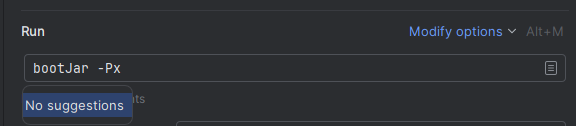
When I try to edit “Run” field in a gradle run/debug configuration, every keystroke is interrupted with a highlighted “No suggestions”, so I have type type ESC after every keystroke. This is not the case, when I used IntelliJ without Gateway. I'm using IntelliJ IDEA Ultimate 2024.3.5 and Gateway 2024.3.3 on Windows, the remote host is WLS 2 ubuntu 24.04.
请先登录再写评论。
Could you please check with the 2025.1 version inside the WSL? It will be released this week. We recently fixed this issue.
How can I update the WSL Client? Gateway and IntelliJ are on 2025.1, but connecting via Gateway to WSL, the JetBrains Client for IntelliJ IDEA still shows 2024.3.5, trying to update shows
https://www.jetbrains.com/help/idea/remote-development-a.html#change_backend_version
The appropriate client will be downloaded automatically after that.
Hello Semyon,
with IntelliJ IDEA 2025.1.1 RC editing the “run” field is not interrupted anymore. Works like a charm. Issue is fixed. Thank you!
Hans
Thank you for the link how to change the backend IDE Version!