MainMenu.foreground Inaccessible While Developing Theme

I am trying to develop a theme for intelliJ, but I am running into a problem in that the keys provided in the json are missing a key.
Specifically, I am trying to make it such that the main menu items (File, Edit, View, etc.) have a red foreground by default, but when selected the foreground changed to a blue.
Right now i have it set up such that the menu items, when selected, turn to a light blue background with a darker blue foreground. It appears that the main menu actually shares this key but does not respect the foreground. The submenu items will properly go blue background with a dark blue foreground, yet the main menu items will go blue background but revert to a white foreground instead of changing to a dark blue foreground.
Inspecting it, I find that the main menu items (File, Edit, View, etc.) are all MainMenu objects, and the submenu items (such as the items under File) are all Menu objects.
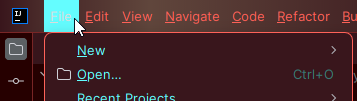
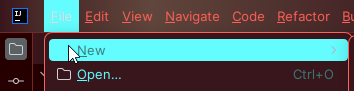
the json file I am working with describes this:
Note: colorDebug is a magenta (#FF00FF) I am using to see what elements are actually changing colors. In this case the keys with this color I have yet to find what UI element they actually correspond to as I haven't seen the magenta pop up yet.
    ...
    "Menu": {
      "separatorColor": "debugColor",
      "foreground": "foregroundBluePrimary",
      "selectionBackground": "foregroundBluePrimary",
      "selectionForeground": "foregroundBlueSecondary",
      "acceleratorSelectionForeground": "foregroundBlueSecondary"
    },
    "MenuBar": {
      "foreground": "foregroundRed",
      "selectionBackground": "foregroundBluePrimary",
      "selectionForeground": "foregroundBlueSecondary",
      "borderColor": "colorDebug",
      "shadow": "colorDebug",
      "disabledForeground": "colorDebug",
      "disabledBackground": "colorDebug"
    },
    "MenuItem": {
      "foreground": "foregroundBluePrimary",
      "acceleratorForeground": "foregroundBlueSecondary",
      "disabledForeground": "foregroundBlueSecondary",
      "selectionBackground": "foregroundBluePrimary",
      "selectionForeground": "foregroundBlueSecondary",
      "acceleratorSelectionForeground": "foregroundBlueSecondary"
    },
    ...
The question is: for the purposes of developing a theme, am I limited to the keys I can manipulate in the json? Is there a way to change the MainMenu colors outside of the json and provide that with the plugin? Or, am I simply missing a key? Is a key being overridden?
请先登录再写评论。
I found it!
Turns out although
MainMenu.foregroundin the json editor warns that it's an “unrecognized key,” it actually DOES exist as a key! So setting“MainMenu.foreground": "someColor"actually is valid but throws a warning despite it being valid.If you stumble across this and you have trouble, realize that some keys are just not recognized but actually exist.
Another thing to note is that some deprecated keys are actually still used despite being docced as “not used,” such as
MenuItem.acceleratorSelectionForeground.