Kotlin Gradle New Project Error Intellj Community

After I create an example project Kotlin and Gradle. It show following error.
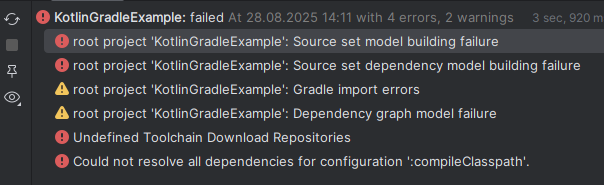
build.gradle.kts is default one
plugins {
java
application
id("org.jetbrains.kotlin.jvm") version "2.1.20"
id("org.javamodularity.moduleplugin") version "1.8.15"
id("org.openjfx.javafxplugin") version "0.0.13"
id("org.beryx.jlink") version "2.25.0"
}
group = "com.example"
version = "1.0-SNAPSHOT"
repositories {
mavenCentral()
}
val junitVersion = "5.12.1"
tasks.withType<JavaCompile> {
options.encoding = "UTF-8"
}
application {
mainModule.set("com.example.kotlingradleexample")
mainClass.set("com.example.kotlingradleexample.HelloApplication")
}
kotlin {
jvmToolchain( 17 )
}
javafx {
version = "21.0.6"
modules = listOf("javafx.controls", "javafx.fxml")
}
dependencies {
testImplementation("org.junit.jupiter:junit-jupiter-api:${junitVersion}")
testRuntimeOnly("org.junit.jupiter:junit-jupiter-engine:${junitVersion}")
}
tasks.withType<Test> {
useJUnitPlatform()
}
jlink {
imageZip.set(layout.buildDirectory.file("/distributions/app-${javafx.platform.classifier}.zip"))
options.set(listOf("--strip-debug", "--compress", "2", "--no-header-files", "--no-man-pages"))
launcher {
name = "app"
}
}
请先登录再写评论。
Hello!
Thank you for the reporting this!
Testing this scenario on my end the Sync appears to complete successfully.
Does Gradle work as intended with the Project, if you run it from the OS Command Prompt?
You can also add
to the Project's
gradle.propertiesand share the Sync output - this may give us better understanding of why it fails.Create a project windows of intellj community, jdk 21 is selected.
But after creation of this project, in file build.gradle.kts, why it is still 17, thats why I got the error above, after change it manually to 21, the sync is fine.
Yong Zheng Thank you for sharing the details!
The
JDKoption in the New Project Wizard defines a JDK that will be used by IDEA for the Project.Once the Project is created it can be viewed and changed in the Project Structure window ("
SDK" option).This configuration
is Gradle-specific and is defined by the New Project Generator ("
JavaFX" in this case).