Problems with recent IntelliJ versions

I have some issues with a complex maven project in IntelliJ.
So far my strategy was to follow “latest is greatest” and continuously installed the latest versions of IntelliJ (ultimate) in order to get the latest bugfixes.
However, my situation got worse and worse.
Some examples:
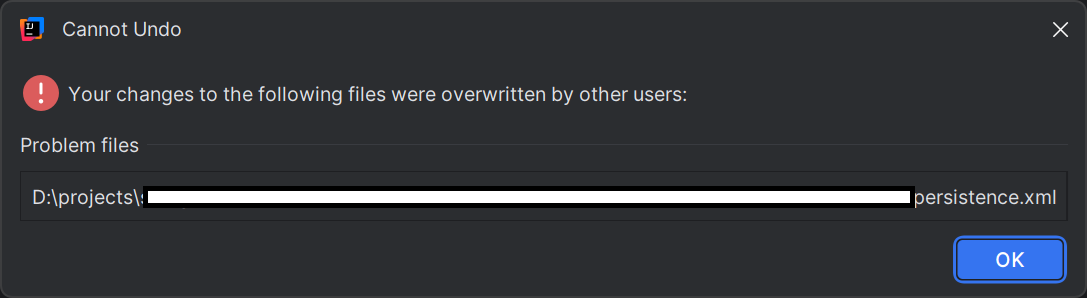
After saving Undo is broken:
Sometimes I cannot even launch IntelliJ at all and get errors like this:

Very often when I want to run the app or a test IntelliJ fails compiling the code with this error:
> java: Source option 5 is no longer supported. Use 7 or later.
This makes no sense to me at all. Rerunning the same and the error goes away. But every build takes many minutes so turnaround times are massively increasing.
Also it seems that indexes are continuously rebuild taking sometimes 10+ minutes. After all the indexes should be used to speed up my IDE but it seems they cause rather the opposite. Sometimes IntelliJ completely grays out its UI and freezes for long time. Also strange is that if I want to open another project in IntelliJ this is only possible via the same process of IntelliJ and if my IntelliJ is slow or even freezing, I cannot even open another window or project to work in parallel on. With eclipse this was easily possible but if I start IntelliJ the first thing it does is trying to find if the IntelliJ process is already running and if so it just sends an event to that process to open the project showing me this popup if I want to open in existing or new window. If that process is however a zombie or slow then nothing will happen at all and I do not get any feedback from my actual launch of IntelliJ what is very confusing for users (at least unless you understand and the complex design decisions made behind the scene).
IntelliJ does not seem to have a concept of milestone releases like in Eclipse for testing major changes by the community upfront before they become official.
Does someone have experience which version of IntelliJ ultimate works stable so I could downgrade to that one?
请先登录再写评论。
Hi Joerg,
Sounds like something is corrupting the configuration files inside the IDE. It can be one of the 3rd-party plugins, for instance.
See if it helps to:
My experience with latest IDEA releases quite similar. We have huge multimodule maven projects, the IDEA is almost unusable in such cases. I am not sure, if some firewall rules in our network will also influence the maven features, but with latest IDEA release working with maven multimodule projects is really annoying. Clearing and invalidating the caches did not work for long time. The listing of the projects in the project view is flickering and jumping, you never know if your mouse click was on the correct project. And the projects which are shown is totally accidentally, you never know which is active after restarting, sometimes each maven module is shown as own project, sometimes it shows it hierarchical.
Hi Peter Schumm, thanks for your feedback.
Could you please clarify whether you are using any downloaded (non-bundled) plugins? If yes, please try disabling them (Settings | Plugins | ⚙ | Disable all downloaded plugins).
Also, could you record a screencast video showing reproducing the issue so we can understand exactly how it manifests? And please collect the IDE logs after reproducing the problem using Help | Collect Logs and Diagnostic Data.
Then upload your screencast and logs to our server https://uploads.jetbrains.com/ and provide us with the Upload ID. The uploaded data will be accessible only to our team and will be used solely for investigating this issue.
Thank you!