Incorrect 'Cannot find module' error in .ts files

Hello.
I've recently been migrating my Meteor project from .js to .ts.
My project compiles just fine, however my .ts files have squiggly red errors underneath every single import, regardless of whether I import them with file extensions specified.
The error I get for all imports in these .ts files is "TS2307: Cannot find module /imports/lib/shared/vis/world or its corresponding type declarations."
Clearly the compiler is having no trouble finding these files since there are no errors and the app functions. I'd love to figure out how to get WebStorm to stop complaining.
Some data to hopefully diagnose the issue:
- I have a jsconfig.json file to fix WebStorm auto-importing files without leading slashes. Without this, autoimports show as “some/path.js” rather than “/some/path”, which is what I need. Here it is:
{"compilerOptions": {"baseUrl": ".","paths": {"/*": ["./*"]}}}
- I have a tsconfig.json file as well, and this comes from not knowing what I'm doing and using ChatGPT for hours to try to figure out the problem. I'm not married to any of this. I just want to be able to intermingle .js and .ts files without this import error.
{"compilerOptions": {"jsx": "react-jsx","allowSyntheticDefaultImports": true,"esModuleInterop": true,"moduleResolution": "node","target": "es2018","lib": ["es2018", "dom"],"strict": true,"allowJs": true,"checkJs": false,"noResolve": false,"skipLibCheck": true},"include": ["**/*.ts","**/*.tsx"]}
-
WebStorm settings which may be relevant:
General → Auto Import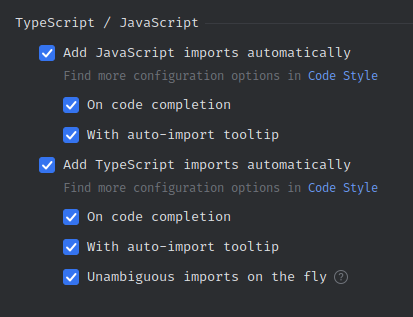
If anyone's got any suggestions, I'd be happy to test them out.
Thanks for reading!
请先登录再写评论。
Please try defining the same path mappings you have in the
jsconfig.jsonin yourtsconfig.json:"baseUrl": ".","paths": {"/*": ["./*"]}The Typescript compiler service doesn't use the
jsconfig.jsonfile, all path aliases have to be re-defined in the tsconfig file.Hey, that worked! I'd tried this but I think I'd failed to put the
baseUrlobj nested withincompilerOptions.Thank you so much! This is such a huge relief to get this sorted!